Thursday, May 3, 2018

Georges Méliès Google doodle pays tribute to visionary French film director with first-ever VR doodle

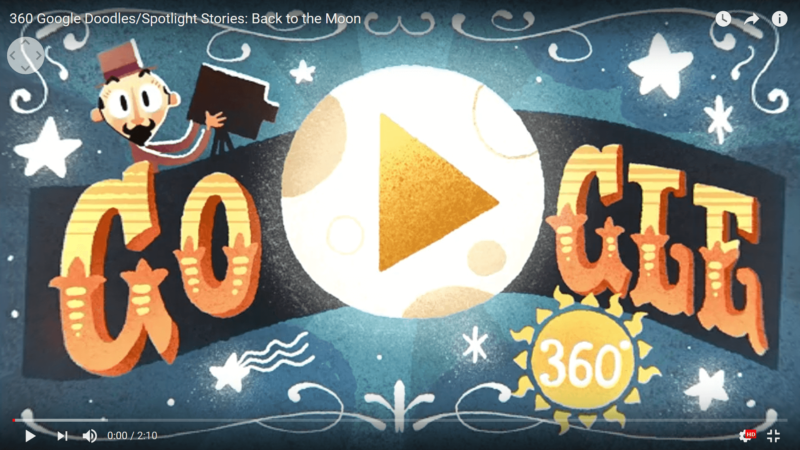
Google is trying something entirely new with today’s doodle, producing its first ever virtual reality/360° interactive video to honor legendary film director Georges Méliès. The cutting-edge VR technology employed in the doodle reflects his groundbreaking special effects work in early cinematography.

In addition to being a film director, Méliès was a magician, illusionist, storyteller and visionary. Two of his films produced during the first decade of the 20th century — “Le Voyage dans la Lune” (“A Trip to the Moon”) in 1902 and “Le Tunnel sous la Manche ou le Cauchemar franco-anglais” (“Tunneling the English Channel”) in 1906 — would predict historical events that happened years after the films were released.

Today’s doodle is being shared on the 106th anniversary of Méliès’s “A la Conquête du Pôle” (“The Conquest of the Pole”), which was a magical retelling of the story of Norwegian explorer Roald Amundsen, who led the first expedition to the South Pole.

The video created by Google to honor Méliès, titled “Back to the Moon,” can be viewed from Google’s home pages around the world on desktop or mobile, as well on the Google Spotlight Stories YouTube channel. To get the full effect of the virtual reality film, the film has to be viewed on a VR headset or Google Cardboard.

To create the doodle, part of Google’s effort to spotlight stories, arts and culture, doodle teams partnered with the Cinémathèque Française to highlight Méliès’ extraordinary use of special effects during the early days of cinema. Google recruited Laurent Manonni, the director of heritage for The Cinémathèque Française, to share what made Méliès’s work so special:

Méliès’ contribution to the seventh art was revolutionary. In a time when cinematography was nascent and almost exclusively documentary-style, Méliès single handedly opened the doors of the dream, the magic, and the fiction. He accomplished this fundamental act by uniting the universes of Robert-Houdin with the chronophotography and cinematography of Marey and the Lumière brothers. The entire body of Méliès’ work shines with dynamic fantasy, boundless imagination, and an irresistible jubilation. The worlds he created were explosive and a unique mixture of phantasmagoria, devilry, trompe-l’oeil, illusions, flames, fumes, and vapors.

Hélène Leroux, the lead doodler on the George Méliès doodle, says her team wanted to call attention to some of the Méliès most well-known camera tricks, such as how he would film himself multiple times using the same film strip or stop filming and switch characters before starting to film again. He would also place a black screen in front of the camera to give the illusion that objects being filmed were disappearing.

Leroux says she also wanted the doodle to represent the handmade worlds Méliès created in his films: “It was an honor to have been a part of creating an original story and experience to remind people of how much Méliès brought to the world. We hope it will inspire others to bring their own dreams to life.”

The post Georges Méliès Google doodle pays tribute to visionary French film director with first-ever VR doodle appeared first on Search Engine Land.

AdWords Editor 12.3 is out with more robust filtering, search query reports & more

Google released the latest version of AdWords Editor this week with several new features, including the ability to download search terms reports, more robust filtering options, account-level extension associations and more.

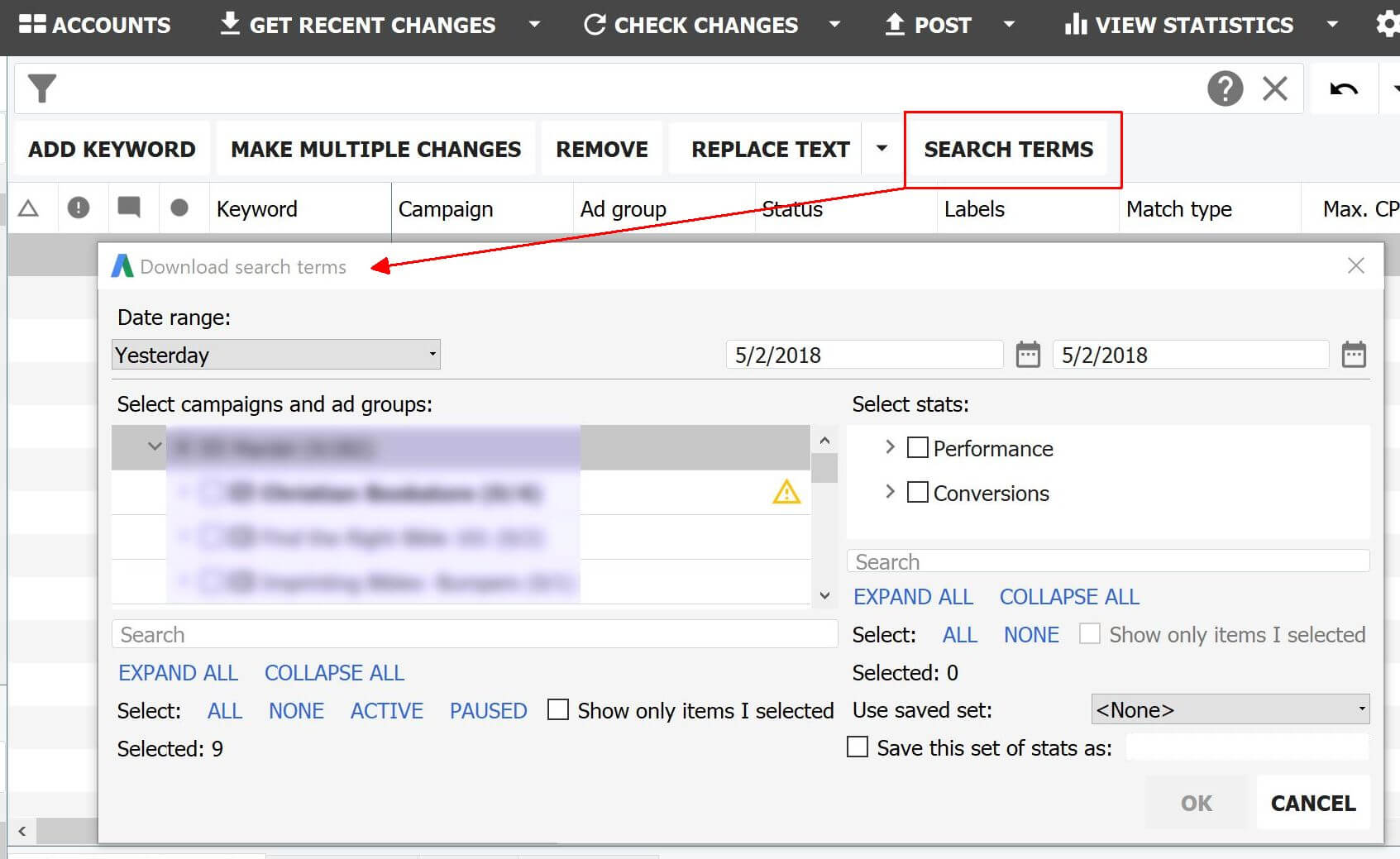
When viewing keyword lists in AdWords Editor, a new Search Terms tab is now available. As shown in the screen shot below, clicking on the Search Terms tab brings up a window in which advertisers can select campaigns, ad groups and the metrics they want to download and analyze. There’s also an option to save the reporting preferences.

A new Search Terms tab in AdWords Editor, available from the Keywords list, allows advertisers to download search terms reports.

There are eight functions now available from the advanced search box that allow advertisers to build queries on items contained in the item being filtered when those items meet specific criteria.

For example, you could choose to show campaigns with less than a certain number of keywords or only show keywords whose owning ad group meets certain conditions. You can find more details on using these filter functions on the help page.

Eight filter functions now available in AdWords Editor.

AdWords Editor 12.3 also supports account-level extension associations, interest categories for Search and Shopping campaigns, custom intent audiences, TrueView for action campaigns and responsive search ads, which are now in beta.

See the full list of capability updates here.

The post AdWords Editor 12.3 is out with more robust filtering, search query reports & more appeared first on Search Engine Land.

How to turn a boring email into an irresistible link pitch

Link building starts with an email between two people.

More often than not, these are two people who don’t know each other. Yes, you know who this person is since you’re sending the email, and you think she will love your content. But be honest, you’re really a complete stranger to her.

Now add the fact that she probably has 30 or more unopened emails sitting in her inbox. How will your email catch her attention?

Let’s say you wrote an eye-catching subject line that made her open your email immediately. Does that guarantee she’ll read through your email and give you a link?

Not quite.

She doesn’t know you, she doesn’t owe you anything.  If you want to get her attention and a link,  you need to pitch your story to her.

You can’t pitch her if she stops reading right then and there; you need to grab her attention with the first sentence.

And the next.

And the one after that.

Do you see where I’m going with this?

Your job is done only when she’s read the full email, checked out your content, shared your stuff and linked to it. That’s a lot to ask from someone who probably received a dozen emails just like yours on the same day.

When you consider that roughly 269 billion emails were sent and received each day in 2017, it’s clear that link builders are facing serious competition to get their emails read.

So how can you make sure that your email doesn’t get trashed, archived or marked as spam seconds after it landed in the desired inbox?

Enter grease-slide copy

Grease-slide copy is a copywriting technique used to keep readers glued to the page.  Phrases like:

But wait – there’s more.

Yes, you read that right…

We’re not through yet.

These types of sentences keep you reading through the copy almost without you realizing it.  The whole point of grease-slide words and phrases is simple, once you start reading, you can’t stop reading.

It’s the perfect tool for an outreach email because it helps you quickly connect to someone who probably doesn’t know who you are.

Outreach emails

There are hundreds of words and phrases that fall into the grease-slide category but not all of them will help you get links.  I’ve tested many of them and have identified four distinct types of grease-slide copy that works.

1. Setting the scene

What better way to get your foot in the door than sparking a bit of intrigue? Setting the scene allows you to create a mental image in your recipient’s mind, and this is an invaluable tool that you can use right at the start of your pitch:

Use these phrases to turn the opening of your pitch into a call for adventure:

  • Picture this.
  • It begins with a feeling of.
  • Think about this for a moment.
  • Just imagine.
  • You know the score.

2. Getting them on your side

If you can show you’re on their emotional side, they are more likely to keep reading.

This is also a very effective way to turn a simple pitch into an emotional experience:

Use these phrases to make your recipient feel what you feel:

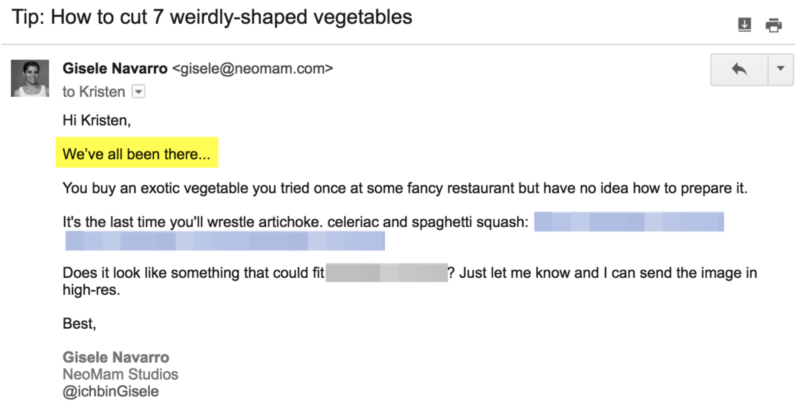
  • We’ve all been there.
  • OK, I know what you’re thinking.
  • I know the feeling.
  • We all do it.
  • It’s not just you who …

3. Making a point

You will leave a much stronger impression if you use grease-sliding phrases to help you command their attention (or create a temporary moment of suspense) right before you get down to business:

Use these phrases whenever you’ll be making an important point you don’t want the recipient to miss:

  • Here’s the deal:
  • So what’s it all mean?
  • But there’s one problem.
  • Bottom line:
  • Here’s another way to think about it.

4. Sliding them into your content

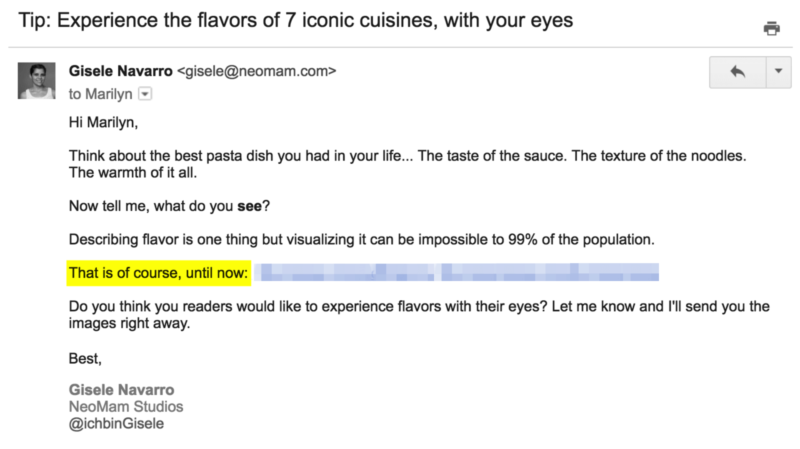
This is my favorite tactic. When pitching, I drop the uniform resource locator (URL) to the content I’m promoting into my email, so I use grease-sliding phrases to ensure the recipient feels the urge to click on the link:

Use these phrases to ensure that your pitch is not the end, but just the beginning:

  • Until now:
  • Not exactly:
  • But that’s just the tip of the iceberg.
  • Here’s why:
  • It’s (faster) (better) (longer) … than you think.

Every word matters

A long-winded introduction, too much information and never-ending paragraphs can be the difference between getting a link and your email getting trashed.

When it comes to outreach, there’s a myriad of different styles, but whatever your personal style, it doesn’t hurt to apply tried and tested copywriting techniques. When you’re pitching your content to a person who doesn’t know you, every word matters.

Next time you’re writing an outreach email, try incorporating at least one of these grease-slide phrases.

Now, go get some links!

The post How to turn a boring email into an irresistible link pitch appeared first on Search Engine Land.

Microsoft launches new audience network, ‘Audience Ads’ at Bing Partner Summit

This morning at the Bing Partner Summit, at Microsoft headquarters, the company announced a new display network, the Microsoft Audience Network (MSAN). Though the company has had the “Bing Audience Network,” the new offering brings together a number of elements that weren’t previously available: Bing search-intent signals, Microsoft’s AI capabilities and the Microsoft audience graph.

AOL has to date been the exclusive seller of Microsoft display advertising. And to run display ads, including on Microsoft properties, marketers had to make a separate buy with AOL. (I’ve asked Microsoft whether this announcement ends the AOL partnership but have yet to hear back.)

Now, Bing search advertisers will be able to extend their campaigns through what Microsoft is calling “Audience Ads” across various Microsoft and third-party properties. There are two options for marketers:

  • Audience Ads search-extensions. Currently launching for the US, the UK, Canada, Australia, with other markets to follow. This is a basic approach that pushes the Bing campaign out to the broader MSAN.
  • Audience Ads campaigns. These include dedicated/optimized creative and separate reporting. This is US only for now, with a global rollout planned for later in the year.

The immediate question is: What makes MSAN and Audience Ads different, compared with Google or Facebook? Google can extend search query data into display campaigns. Google also offers audience targeting. Both Google and Facebook have AI and machine-learning assets.

Steve Sirich, general manager of search advertising at Microsoft, cited several factors: brand safety, the Microsoft graph and the quality of the MSAN. He also argued that the audience graph includes millions of people “you can’t reach on Google or Facebook.”

Microsoft says, for example, that there are 63 million search users that Google can’t reach in the MSAN. Bing reportedly sees over 20 billion monthly searches around the world and has more than 500,000 active Bing advertisers.

The Microsoft audience graph consists of 120 million Office365 subscribers, 1.5 billion Windows users and 500 million LinkedIn users. LinkedIn professional data is a unique element in the mix. There’s also data from Outlook and Skype users.

The company hasn’t yet disclosed any third parties participating in the network publicly. However, display ads will appear on Microsoft properties such as MSN, Outlook.com and the Edge browser.

As indicated, Sirich told me that the Microsoft Audience Network will initially be available in the US, the UK, Canada and Australia. He added that it’s privacy- and GDPR-compliant for the UK market.

Sirich explained that while there are extensive audience targeting capabilities, there’s “no sensitive targeting” (e.g., politics, religion). As mentioned, Microsoft has also taken special care to protect brand safety. He added that this is being “managed carefully and closely.”

Beta advertisers that have been testing Audience Ads include Kohl’s, Lending Tree and HomeAdvisor.

The post Microsoft launches new audience network, ‘Audience Ads’ at Bing Partner Summit appeared first on Search Engine Land.

Wednesday, May 2, 2018

SearchCap: Crawl budget, content development & shopping ads

Below is what happened in search today, as reported on Search Engine Land and from other places across the web.

From Search Engine Land:

Recent Headlines From Marketing Land, Our Sister Site Dedicated To Internet Marketing:

Search News From Around The Web:

The post SearchCap: Crawl budget, content development & shopping ads appeared first on Search Engine Land.

The ultimate guide to bot herding and spider wrangling — Part Two

In Part One of our three-part series, we learned what bots are and why crawl budgets are important. Let’s take a look at how to let the search engines know what’s important and some common coding issues.

How to let search engines know what’s important

When a bot crawls your site, there are a number of cues that direct it through your files.

Like humans, bots follow links to get a sense of the information on your site. But they’re also looking through your code and directories for specific files, tags and elements. Let’s take a look at a number of these elements.

Robots.txt

The first thing a bot will look for on your site is your robots.txt file.

For complex sites, a robots.txt file is essential. For smaller sites with just a handful of pages, a robots.txt file may not be necessary — without it, search engine bots will simply crawl everything on your site.

There are two main ways you can guide bots using your robots.txt file.

1. First, you can use the “disallow” directive. This will instruct bots to ignore specific uniform resource locators (URLs), files, file extensions, or even whole sections of your site:

User-agent: Googlebot
Disallow: /example/

Although the disallow directive will stop bots from crawling particular parts of your site (therefore saving on crawl budget), it will not necessarily stop pages from being indexed and showing up in search results, such as can be seen here:

The cryptic and unhelpful “no information is available for this page” message is not something that you’ll want to see in your search listings.

The above example came about because of this disallow directive in census.gov/robots.txt:

User-agent: Googlebot
Crawl-delay: 3

Disallow: /cgi-bin/

2. Another way is to use the noindex directive. Noindexing a certain page or file will not stop it from being crawled, however, it will stop it from being indexed (or remove it from the index). This robots.txt directive is unofficially supported by Google, and is not supported at all by Bing (so be sure to have a User-agent: * set of disallows for Bingbot and other bots other than Googlebot):

User-agent: Googlebot
Noindex: /example/
User-agent: *
Disallow: /example/

Obviously, since these pages are still being crawled, they will still use up your crawl budget.

This is a gotcha that is often missed: the disallow directive will actually undo the work of a meta robots noindex tag. This is because the disallow prevents the bots from accessing the page’s content, and thus from seeing and obeying the meta tags.

Another caveat with using a robots.txt file to herd bots is that not all bots are well-behaved, and some will even ignore your directives (especially malicious bots looking for vulnerabilities). For a more detailed overview of this, check out A Deeper Look at Robots.txt.

XML sitemaps

XML sitemaps help bots understand the underlying structure of your site. It’s important to note that bots use your sitemap as a clue, not a definitive guide, on how to index your site. Bots also consider other factors (such as your internal linking structure) to figure out what your site is about.

The most important thing with your eXtensible markup language (XML) sitemap is to make sure the message you’re sending to search engines is consistent with your robots.txt file.

Don’t send bots to a page you’ve blocked them from; consider your crawl budget, especially if you decide to use an automatically generated sitemap. You don’t want to accidentally give the crawlers thousands of pages of thin content to sort through. If you do, they might never reach your most important pages.

The second most important thing is to ensure your XML sitemaps only include canonical URLs, because Google looks at your XML sitemaps as a canonicalization signal.

Canonicalization

If you have duplicate content on your site (which you shouldn’t), then the rel=“canonical” link element tells bots which URL should be considered the master version.

One key place to look out for this is your home page. Many people don’t realize their site might house multiple copies of the same page at differing URLs. If a search engine tries to index these pages, there is a risk that they will trip the duplicate content filter, or at the very least dilute your link equity. Note that adding the canonical link element will not stop bots from crawling the duplicate pages. Here’s an example of such a home page indexed numerous times by Google:

Pagination

Setting up rel=”next” and rel=”prev” link elements correctly is tricky, and many people struggle to get it right. If you’re running an e-commerce site with a great many products per category, rel=next and rel=prev are essential if you want to avoid getting caught up in Google’s duplicate content filter.

Imagine that you have a site selling snowboards. Say that you have 50 different models available. On the main category page, users can view the first 10 products, with a product name and a thumbnail for each. They can then click to page two to see the next 10 results and so on.

Each of these pages would have the same or very similar titles, meta descriptions and page content, so the main category page should have a rel=”next” (no rel=”prev” since it’s the first page) in the head portion of the hypertext markup language (HTML).  Adding the rel=”next” and rel=”prev” link element to each subsequent page tells the crawler that you want to use these pages as a sequence.

Alternatively, if you have a “view all” page, you could canonicalize to that “view all” page on all the pagination pages and skip the rel=prev/next altogether. The downside of that is that the “view all” page is what is probably going to be showing up in the search results. If the page takes too long to load, your bounce rate with search visitors will be high, and that’s not a good thing.

Without rel=”canonical,” rel=”next” and rel=”prev” link elements, these pages will be competing with each other for rankings, and you risk a duplicate content filter. Correctly implemented, rel=prev/next will instruct Google to treat the sequence as one page, or rel=canonical will assign all value to the “view all” page.

Common coding issues

Good, clean code is important if you want organic rankings. Unfortunately, small mistakes can confuse crawlers and lead to serious handicaps in search results.

Here are a few basic ones to look out for:

1. Infinite spaces (aka spider traps). Poor coding can sometimes unintentionally result in “infinite spaces” or “spider traps.” Issues like endless URLs pointing to the same content, or pages with the same information presented in a number of ways (e.g., dozens of ways to sort a list of products), or calendars that contain an infinity of different dates, can cause the spider to get stuck in a loop that can quickly exhaust your crawl budget.

Mistakenly serving up a 200 status code in your hypertext transfer protocol secure (HTTP) header of 404 error pages is another way to present to bots a website that has no finite boundaries. Relying on Googlebot to correctly determine all the “soft 404s” is a dangerous game to play with your crawl budget.

When a bot hits large amounts of thin or duplicate content, it will eventually give up, which can mean it never gets to your best content, and you wind up with a stack of useless pages in the index.

Finding spider traps can sometimes be difficult, but using the aforementioned log analyzers or a third-party crawler like Deep Crawl is a good place to start.

What you’re looking for are bot visits that shouldn’t be happening, URLs that shouldn’t exist or substrings that don’t make any sense. Another clue may be URLs with infinitely repeating elements, like:

example.com/shop/shop/shop/shop/shop/shop/shop/shop/shop/…

2. Embedded content. If you want your site crawled effectively, it’s best to keep things simple. Bots often have trouble with JavaScript, frames, Flash and asynchronous JavaScript and XML (AJAX). Even though Google is getting better at crawling formats like Javascript and AJAX, it’s safest to stick to old-fashioned HTML where you can.

One common example of this is sites that use infinite scroll. While it might improve your usability, it can make it difficult for search engines to properly crawl and index your content. Ensure that each of your article or product pages has a unique URL and is connected via a traditional linking structure, even if it is presented in a scrolling format.

In the next and final installment of this series, we’ll look at how bots are looking at your mobile pages, discuss if you should block bad bots, and dive into localization and hreflang tags. Stay tuned!

The post The ultimate guide to bot herding and spider wrangling — Part Two appeared first on Search Engine Land.

Searcher intent: The secret ingredient behind successful content development

Google’s goal is to satisfy a searcher’s intent. When a user finds what they’re looking for after clicking on an organic search result, that’s a success.

Sounds easy enough, but things get complicated when there are multiple results that may fulfill the primary intent of a given query.

What is “the primary intent of a given query?” Let’s look at the search phrase “Real estate in Miami” to help answer the question.

Primary intent

Someone searching the term “real estate in Miami” is probably looking to either buy or sell a property. This is the primary intent of the search phrase. We could search virtually any site that accesses a Multiple Listing Service (MLS) in the United States and finds results using the phrase.

Algorithms use math and math (in this context) and rely on probability. When Google is determining which results to rank highest, they are looking to maximize the probability that the searcher will leave satisfied. When many indexed sites meet a primary intent, the algorithm needs to look at secondary intents to see what other information the searcher may be looking for.
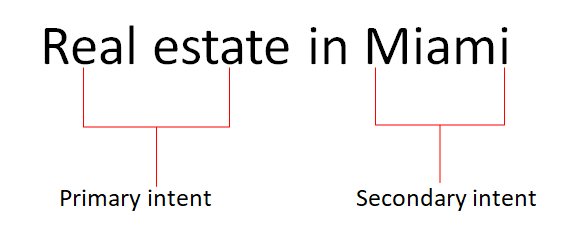
Secondary intents increase the probability a site will meet their intent. Here’s a very simple example:

  • Assume 90 percent of the searchers were looking to buy or sell real estate.
  • Assume that 10 percent of the searchers were looking for information on the real estate market in Miami.

Most, if not all sites, will fulfill the 90 percent of intents, but only those sites with information on the market itself (Miami) on top of the listings would fulfill 100 percent of the users’ intents.

In the absence of such a site, Google must provide listings that fulfill different intents, knowing any given searcher may potentially click the result that fulfills the wrong intent and be disappointed.

This happens when it’s the only option Google has, or for diversity, but when a single resource fulfills multiple intents and thus increases the probability they will satisfy the user, that site is more likely to rank.

There is supplemental data that doesn’t match the first intents but which does match supplemental needs. When a searcher has fulfilled their primary intent (found properties of interest, read the market research and so on), it’s logical that they may have a next step.

For example, when searching for real estate in Miami, it’s logical to want to know what schools are in the area, the crime rate, property values and more. Once you find a site that provides the information, and based on history, Google knows what query will probably be searched on next.

If your website contains the information of the next request, there is a high probability that your site will fulfill that searcher’s intent.

You need to be a fortune teller

This leaves you, me and everyone else with the problem of determining exactly what “user intent” means.

This is especially annoying if you like to work with hard numbers. How do you put a hard number on something like meeting user intent? With complex machine learning algorithms, a massive data center and a sneak peek at Google’s algorithms, it might be possible, but let’s assume for a second we don’t have the time, skill or resources for that.

I had to come up with a way to determine where the holes were in the canvas we’re painting to satisfying user intent and come up with a way of determining where these holes were acceptable and where they were not.

Step 1: Building a keyword list

The first step is going to be building a keyword list. Chances are you’ve done this before, but this time we’re going to be expanding our search beyond those conversion phrases we often focus on.

The conversion phrases you probably already have in your lists are likely (though not necessarily) focused on primary intent terms. If you are a realtor in Miami, terms like “Miami real estate” are on your list.

This time, we’re going to take a different approach. We’re going to look for the secondary and supplemental intent terms, which can be a tedious task but incredibly valuable.

The first thing you’ll do is head over to your favorite keyword research tools. Each has its pros and cons, but thankfully, for our purposes, it doesn’t really matter which you use. We’re not looking for traffic estimates, we’re looking for content ideas so that specific search volumes don’t matter as much as understanding the ratios.

I’m going to assume everyone in the audience either has access to Google’s Keyword Planner or can convert the process to the tool you use. Now it’s time to build your list.

How broad you want to go on your keyword research will vary by your niche, but I generally suggest going as broad as possible. In this instance, I would start with the single word “Miami” and get the results:

Add all the keywords to a plan, making sure to choose “exact” as the match type. Doing so does not actually add all the top queries that include “Miami”; Google reduces the queries to what they deem likely, so they don’t include everything.

To supplement this list and ensure you are getting all the most important terms, you’ll also want to query “Miami real estate,” “Miami homes,” “Miami neighborhoods,” “Miami mortgages” and pretty much anything else you can think of that your target market might look for related to primary and secondary intents.

Download your list and delete all the columns other than the Keyword and Average Monthly Searches (exact match only). Now the real work begins.

Step 2: Time to classify

The next step is to classify your keywords.

Group your terms together by their intent. The more granular you get, the better.

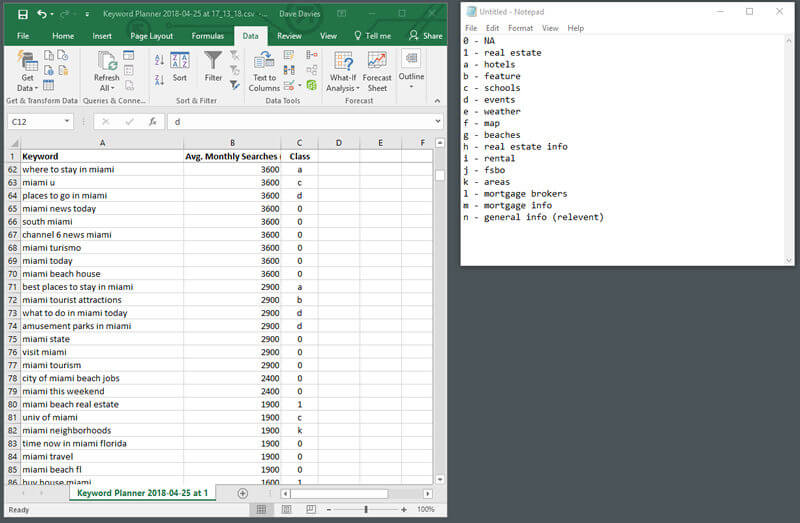
You can use whatever system you like to classify your keywords. To keep things simple, I tend to add a column to my spreadsheet and use an alphanumeric key.

If it’s a short list with a few classes, I’ll use numbers. If it’s a larger list, I’ll go with letters or a combination depending mostly on keyboard position.

It’s important to also keep a notepad doc or similar log of what your classifications mean. It’s only worth classifying items that might conceivably be of interest to a searcher prior to, during or shortly after the conversion cycle.

I kept the categorization a little more basic here. For example, you may notice I lumped all events into one class to include everything from “what to do” queries to places to go. There are times when a broad approach like this may work well as a first round, followed by a second round of this same research for each section if it’s going to be a substantial build-out. I won’t be taking it that far, but this needed to be noted.

At the end of this stage, you’ll have something that looks like:
Step 3: Numbering

The next step is to put some numbers on the various types of content.

You’ve determined all the queries not classified “not applicable” (NA) could be involved at some point in the searcher’s journey. Using what we have, we can see how each of these areas can assist in improving the probability of our site meeting a user’s intent.

1. First, delete all the rows for keywords that have zero relevance.

2. Order by class and then add the key and a probability field like:

3. The next step is to find the total volume of queries that relate in some way to a conversion using the SUM feature:

4. And finally, you’ll use the SUM again to find the percentage impact a specific grouping of content has on intent (with a big BIG caveat we’ll get to shortly). In the probability field for each key entry, you’ll simply add the formula: =SUM(B2:B43)*100/B144

Adjusting the bolded B2:B43 to reflect the class rows (e.g., in rows 2 through 43 in my spreadsheet we had the values for class 1 (real estate).

This part of the formula will add these cells together. The bolded B144 is to be replaced by the cell you created in Step 3 giving the total search volume of all queries.

Altogether, this formula creates the percentage of all relevant searches that each class represents. In our case, we get:

In the last step, we need to adjust the weight because some classes are relevant but not equal.

A user looking for mortgage information is obviously more likely to be interested in real estate than one looking for weather information. So, we need to adjust the numbers based on their impact on the specific users we’re targeting. To do this, we need to add three final columns. Here’s what the final product will look like:

The first column we will add is G, which I have titled “Likely.”  It uses a scale of 100.

I have graded what I believe is the likelihood a searcher of that class of terms would be related to my users.

In my example, I believe 2 percent of users searching for schools are interested in real estate.

In column H, I have added a “Working” column, which is an adjusted value. I need to know what the probability column values would be when I take into account the multiplier from the “Likely” column.

You will notice the “real estate” value is multiplied by 100 in the “Working” column, as it had a “Likely” multiplier of 100. “Schools” only doubled, as it had a multiplier of 2.

This is done by adding the following formula into cell H3:  =F3*G3

If you select the bottom-left corner of the top cell and drag it down (or double-click it), the formula will copy down through the rows you have a “Probability” value for.

Once that’s done, use the SUM formula to add and total all the adjusted values which (in my case) became ~434.38.

And now, the final step is to add the following formula into I3 in what I’ve called my “Adj Weight” column:  =F3*G3/$H$19*100

Drag it down or double-click, and you will need to adjust the bold in the formula to reference the SUM cell in column H.

Notice I have placed a string ($) before the column and row references. When you drag a formula cell to copy it to rows below it, the values change. What was a reference to cell F3 would adjust to cell F4. By placing the string ($) before each value, we stop this from happening, in this case, locking the reference to cell H19 instead of having that value change to H20, H21 and so on.

This formula gives us the percentage weight of each class after our “Likely” value is factored in.

Now we have a roadmap

Now we have a roadmap for content development, and we have assigned a probability to the various content classes.

As with almost all data, this needs to be viewed with a critical eye, but it gives us a very good starting point as to where our opportunities lie and where we should be looking to expand our content to increase the probability of meeting the searcher’s intent.

If the only content that appeared on the site was real estate listings you would have a 54.58 percent probability of meeting the searcher’s intent (when we include secondary and supplemental intents).

If we add content related to schools in the area, we will be adding 13.46 percent probability to our example.

One major consideration to keep in mind is that it all relies on your choosing the right “Likely” values.

Choose incorrectly and you will skew to the wrong types of content. Before launching into valuing classes of content, I generally review the content of the top 10 sites for my primary terms AND also view the top five or 10 sites for content ranking for that class.

This will assist in confirming that you are correct in your valuation; if some or more of your ranking competitors have this content it increases the odds that it is indeed valuable and you’ve assigned correctly.

Reviewing the sites that rank for content using specific keywords will also assist in confirming your interpretation of what the query means or what Google believes the users are looking for is correct.

Conclusion

This is how you put numbers on your content classes to get an idea what types of content will increase the probability that you will meet your searcher’s intent.

In this fast-changing and crucial area of search engine optimization (SEO), this method can help you keep focused on what’s most likely to move the ranking needle.

The post Searcher intent: The secret ingredient behind successful content development appeared first on Search Engine Land.