Wednesday, May 2, 2018

[Report] Shopping ads are eating text ads: accounted for 60% of clicks on Google, 33% on Bing in Q1

Enterprise Digital Analytics Platforms ñ New Market Intelligence Report

Shopping campaigns on Google and Bing continued to fuel paid search spend in Q1 2018, according to digital agency Merkle’s latest quarterly report. Overall, search spend increased 21 percent year over year among the sample of Merkle clients’ US campaigns included in the report [registration required].

Looking at overall performance, cost-per-click (CPC) growth remained relatively steady from Q4 2017, increasing 13 percent year over year. That CPC growth is much higher than what Merkle clients, who skew large retailer, experienced in the earlier quarters of 2017. The rising CPCs have coincided with improved ad quality and higher conversion rates. Click volume growth has slowed significantly over the past two quarters, up 7 percent year over year in Q1 2018.

Source: Merkle Q1 2018 Digital Marketing Report

Google

Merkle clients spent 20 percent more on Google paid search in Q1 2018, on average, than the previous year, marking the fifth straight quarter to see year-over-year spend growth surpass 20 percent. Click volume was up 7 percent, and CPCs increased by 13 percent year over year. Merkle says average CPCs have risen sharply across formats and devices, but that brand keyword text ads have seen the biggest CPC jumps.

Google Shopping grows across all formats

Google Shopping spend shot up 40 percent year over year. That’s the highest rate of growth Merkle has recorded in nearly two years.

Shopping ad impressions increased by 47 percent year over year, and average non-brand CPCs on product listing ads rose 15 percent.

Overall, product listing ads (PLAs) generated 60 percent of retailers’ Google search ad clicks. The increase from 55 percent click share in Q4 2017 represents the biggest quarter-over-quarter jump in more than four years, says Merkle. Non-brand PLA clicks also jumped in Q1, to 82 percent of retailers’ clicks.

Local Inventory Ads (LIA) click share also continues to rise for those participating in the program. On desktop, LIA generated 7 percent of clicks, up from just 1 percent a year ago. Mobile LIA clicks accounted for 15 percent of clicks, up slightly from 14 percent the previous year.

Click share for Showcase Shopping Ads represented 2.7 percent of mobile Google Shopping ad clicks, up from just 1.3 the previous quarter. On tablet, Showcase Shopping Ads drove 3.8 percent of Shopping clicks, up from 1.9 percent in Q4 2018.

Text ads: CPC growth coming in part from top ad positions gaining click share

Spending on text ads slumped to just 4 percent growth in Q1 2018, down from a steady increase of around 15 percent in the prior three quarters. Most advertisers saw text ad impressions fall or stay flat year over year. Non-brand CPCs on text ads rose 7 percent on average.

Meanwhile, brand CPC growth on Google remained high from the previous quarter after seeing negative growth for most of 2017. Average brand CPCs increased by 28 percent year over year, up from 23 percent in Q4 2017. Merkle says it has seen nothing in Google Auction Insights reports to indicate that higher CPCs have been caused by increased competition. The declines in brand CPCs seen last year possibly reflect Google’s changes to Ad Rank thresholds.

Merkle has also observed declining click share for ads in the third and fourth positions at the top of the search results. “These lower position ads had helped depress CPC growth, so as their contribution to clicks has decreased, it has helped drive CPCs higher,” writes Mark Ballard, Merkle director of research, who leads the report.

Customer Match & Similar Audiences have minimal impact on click volume

Looking at the use of audience targeting in AdWords campaigns, overall, audience targeted campaigns accounted for 34 percent of Google Search click share in Q1. The overall increase in click share reflects the steady rising trend of click share for RLSAs (remarketing lists for search ads). Customer Match and Similar Audiences account for just 3 percent click share each, and that has remained steady for several quarters.

Source: Merkle Q1 2018 Digital Marketing Report

Bing & Yahoo

Search ad spend across Bing Ads and Yahoo Gemini (combined in this report) saw robust growth again in Q1, increasing 30 percent year over year. Clicks increased 11 percent and CPCs continued to rise, with 17 percent growth compared to a year ago.

Bing Product Ads gain click share

Bing Product Ad spend continues to drive upward, increasing 64 percent year over year. Product Ad spend increased nearly 700 percent on phones and 41 percent on desktop. Click volume on Bing Product Ads increased 110 percent year over year. Overall, Product Ads click share hit 33 percent, and Product Ads now account for more than 50 percent of retailers’ non-brand clicks.

Text ad spend on Bing and Yahoo increased 24 percent in Q1 2018.

Mobile keeps gaining click share

Phones drove 55 percent of Google clicks, 26 percent of Yahoo Gemini and 18 of Bing Ads search ad clicks. That’s a five-point increase for Bing Ads from last quarter, driven by mobile Product Ad clicks, says Merkle.

The post [Report] Shopping ads are eating text ads: accounted for 60% of clicks on Google, 33% on Bing in Q1 appeared first on Search Engine Land.


Tuesday, May 1, 2018

SearchCap: Google My Business dashboard & API, class action awards & clickbait

Below is what happened in search today, as reported on Search Engine Land and from other places across the web.

From Search Engine Land:

Recent Headlines From Marketing Land, Our Sister Site Dedicated To Internet Marketing:

Search News From Around The Web:

The post SearchCap: Google My Business dashboard & API, class action awards & clickbait appeared first on Search Engine Land.

10 ways to increase calls from paid search

The massive increase in phone calls is one of the most notable side effects of the emergence of the mobile consumer.

By 2019, BIA/Kelsey predicts 162 billion calls to businesses from mobile devices alone. With 70 percent of consumers using click to call from mobile search, it’s time to reimagine stale best practices, add new layers to your analytics and breathe new life into your mobile search campaigns.

Download this step-by-step guide from Invoca to learn how to:

  • Capture key caller data.
  • Use this data to optimize your campaigns, bidding and targeting strategy.
  • Find new areas of opportunity.

Visit Digital Marketing Depot to download “How to Increase Calls from Paid Search: 10 Guaranteed Tactics.”

The post 10 ways to increase calls from paid search appeared first on Search Engine Land.
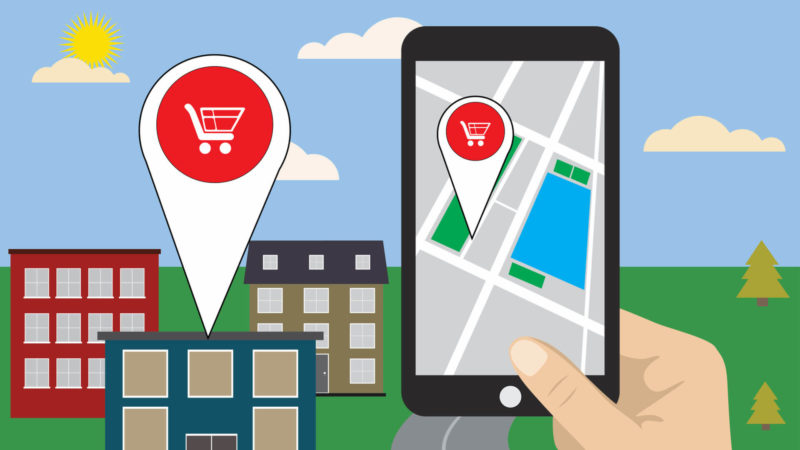
Google launches new Google My Business API, new dashboard to manage multiple locations

Google said this morning that local search on mobile devices is growing faster than mobile search overall — 50 percent year over year. Partly in response, Google has been regularly adding new features to the Knowledge Panel and Google My Business (GMB).

Today, Google announced a new GMB API, new agency dashboard and new agency partner program. The API will enable agencies to manage additional categories of content, such as merchant descriptions and Posts for multilocation brands and small businesses at scale.

Google developed the agency dashboard in collaboration with a couple of its agency partners. The new dashboard promises to be fast. And it enables:

  • A single registered account on GMB to manage an unlimited number of locations.
  • User Groups to manage internal teams and control access to locations.
  • Easier product workflows to manage listings.

Registered agencies are also being given early access to new GMB tools and features. They’ll have a dedicated partner manager and other benefits. There will also be a new partner directory.

Google said that multiple criteria were involved in evaluating potential agency partners for the new program. There isn’t a specific “number of locations under management” requirement, but Google wants to initially focus on agencies that are growing. You can sign up for the agency partner program here.

The new dashboard will become available in the next three weeks.

The post Google launches new Google My Business API, new dashboard to manage multiple locations appeared first on Search Engine Land.

Let’s face it — clickbait works. Here’s how to use it to your advantage

No two ways about it — clickbait works!
With the right page title, you can get people to click on your link in the search engine results pages (SERPs). That means you’ll get more clicks on call-to-action (CTA) elements on your website, which, in turn, should boost your bottom line.

If you’re interested in getting a better click-through rate (CTR) in the search results, then maybe it’s time to up your page title game. Fortunately, you can draw inspiration from others who’ve crafted titles that encourage clicks.

In this article, we’ll look at nine examples of outstanding page titles and go over what they have that makes them appealing and highly clickable.

1. The dynamic template

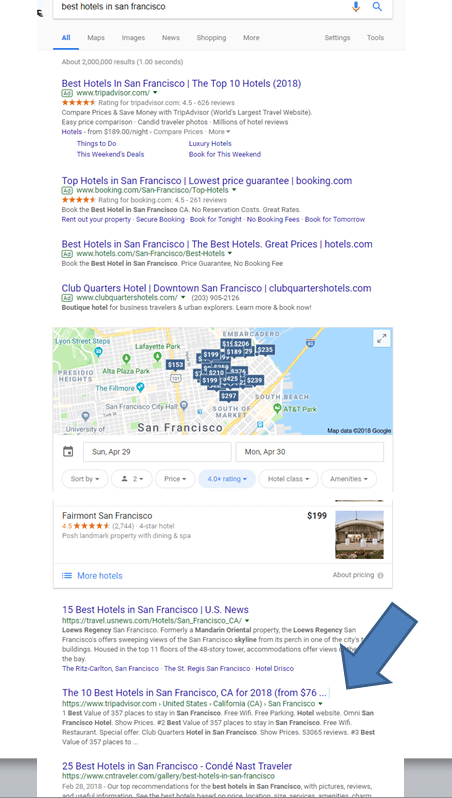
Travel website TripAdvisor uses a title that’s more of a template than an actual title. That’s because the marketing team applies the same title format to different regions.

For example, if you search for “best hotels in San Francisco,” you’ll see that TripAdvisor appears toward the top of the SERPs with this headline:  “The 10 Best Hotels in San Francisco, CA for 2018 (from $76).”

That’s a great headline for a few different reasons.

First, it’s directly related to the query. So anyone who enters that search term in a search engine will be happy with that result.

Second, it uses the current year. That tells people the information on the page is up to date.

Putting the current year in the title is an old favorite trick of search engine optimization specialists (SEOs). If you want to increase your CTR, try adding the year to some of your titles. Even if you don’t make any other changes, you’ll likely see a bump in clicks.

Another reason the TripAdvisor headline works is because it includes the low price right in the title.

Most last-minute travelers would be ecstatic if they could find a hotel in San Francisco for just $76 per night. But the key takeaway here is that TripAdvisor uses that title template for other major cities.

For example, if you search “best hotels in San Diego,” you’ll see a TripAdvisor result in the SERPs with this title:  “The 10 Best Hotels in San Diego, CA for 2018 (from $59).”

Does that look familiar? It should. It’s the same title you saw with the San Francisco search, except the city name and the price are different.

Think about how you can use the TripAdvisor strategy in your own title optimization efforts. Here is the template:

The (number) Best (category) in (city), (state) for (year) (from $ (lowest price)

2. Using headlines

Next, search for “motorcycle helmets.” Skip the ads, go straight to the organic results and take a look at the first page of the results list.

As of this writing, the top result is from RevZilla. I’ve looked at the optimization on RevZilla a lot. They do a great job for e-commerce search engine optimization (SEO).

Here’s what the search result looks like and the title:  “Motorcycle Helmets | Fast, Free Shipping!”

That’s pretty good. The title perfectly matches the search query, and it promises fast and free shipping. Those two points are very important for potential buyers.

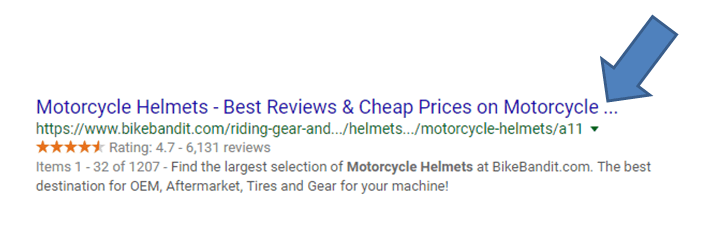
Scroll down a little more. Take a look at the BikeBandit title:  “Motorcycle Helmets – Best Reviews & Cheap Prices on Motorcycle…”

First, note that the headline gets cut off. That’s why you see an ellipsis at the end. Try to avoid letting that happen with your titles. Keep them brief.

Also, think about what they put in the dynamic title. Best reviews? What does that really mean? And cheap prices? That is positive, but it’s best not to use the word “cheap” in marketing, since it can have a negative connotation.

RevZilla is really hitting on what users want. Yes, their title is short, but it gets the job done.

3. Coupons.com

Search for “coupons.” It’s a keyword that operates in a very crowded space, but it’s worth checking out, since it’s frequently searched for.

Unsurprisingly, the Coupons.com website ranks in first place. Given the competitive nature of this phrase, a solid title is important.

One of the main thing to consider when optimizing a coupon website is how many types of coupons you are planning to optimize per category.

The biggest terms are:

  • Free coupons.
  • Printable coupons.
  • Grocery coupons.
  • Coupon codes.

In some cases, coupon sites try to optimize for all of these phrases in a category. In others, they break them up. Out of this group, Coupons.com has done the best job. Their title has been optimized for Printable Coupons, Grocery & Coupon Codes | Coupons.com

We can see they are optimizing for all the top terms, still getting branding in there and manage not to have their title cut off for being too long.

One thing they may want to test would be a template like this: Get 2,000 Printable Coupons, Grocery & Coupon Codes Now!

4. Location-based page

Next, search for the term “car insurance” which is another extremely crowded space.

Scroll down a bit, and you will probably see a location page by Geico. Here is the title for Geico page:  San Diego Car Insurance | GEICO

This is an example of a page that can be improved. I would recommend rewriting to look like this: Best San Diego Car Insurance – You Could Save $500+ | GEICO

They use this language on other page titles on the site, so it could really increase CTR here.

5. Step-by-step guides

Search “how to become an RN.” Here, “RN” stands for registered nurse.

Once again, scroll through the SERPs. Which result stands out?

The Rasmussen.edu title seems like it would attract the most clicks, since it’s positioned very well and has this text in the title: “Your Step-by-Step Guide.” That kind of help is exactly what people are looking for when they search for “how to become an RN.” They need a guide that will take them through each step of the process.

People searching for info often want a hand-holding tutorial. That’s why the “Dummies” books are still in print after all these years. They’re designed for people who are completely unfamiliar with whatever it is they’re trying to learn.

Think about how you can structure your “How to” titles so they appeal to people who don’t know anything about the subject.

6. Numbers win

If you search for “power words,”you’ll see the top results are packed with numbers in the headlines.

For example, the first result is from OptinMonster: “700+ Power Words That Will Boost Your Conversions.” That rightly deserves to be toward the top.

Why? For starters, it has a higher number than anything else on the first page. Scroll down, and you’ll see that all the other titles use numbers that are lower than 700.

Second, the title promises a benefit. If you use their power words, you’ll “boost your conversions.”

That’s an easy formula to follow. Curate a listicle with a high number of items, and create a title that explains how people will benefit from reading it.

7. Promote accuracy

Sitting at #3 is this title, “Internet Ad Spend Is About to Surpass TV Ad Spend [New Report],” after searching on “Internet ad spend.”

The actual keyword is in the headline itself, and that will draw attention from searchers.

Second, note that bracketed segment at the end: “[New Report].”

That’s telling users the article has some data to back up the claim in the headline. It’s a golden rule of advertising to rely on expert witnesses in ad copy, and you can do that in your headlines as well.

8. Recurring theme

Do you see a recurring theme in the search results when you look for “Snapchat marketing?”

The top three results all use the word “ultimate” in the title. For example, the top result is “The Ultimate Guide to Snapchat Marketing.”

So, when in doubt about what to do, curate a “one-stop shop” list with a keyword popular in your niche. Then, create a title with the word “ultimate” in it.

For example: “The Ultimate Guide to Winning the Buy Box on Amazon.”

In that case, the keyword is “winning the buy box.” The article will contain several great pieces of advice that Amazon marketers can follow so their products win the Buy Box.

The user here wants a full guide. Winning the buy box is not an easy thing, and the more information they can find on it the better.

9. Guarantees

Next, search for “saltwater fishing rods.” Scroll through the results list.

Toward the top, you’ll see the typical “boring” results. They match the keyword but don’t add any text that encourages people to click the link.

But it’s a different story for Dick’s Sporting Goods. Their title reads “Saltwater Rods | Best Price Guarantee at Dick’s.”

That’s an incentive, isn’t it? Dick’s is telling people they guarantee their prices can’t be beaten.

Money-minded consumers will find that appealing, so it’s highly likely they’ll click the link before checking out the rest of the results because it appeals to their cost-saving senses.

Conclusion

Write your titles so they outmaneuver the competition in the SERPs. Even if you can’t beat them in rank, you might be able to beat them in clicks.

The post Let’s face it — clickbait works. Here’s how to use it to your advantage appeared first on Search Engine Land.

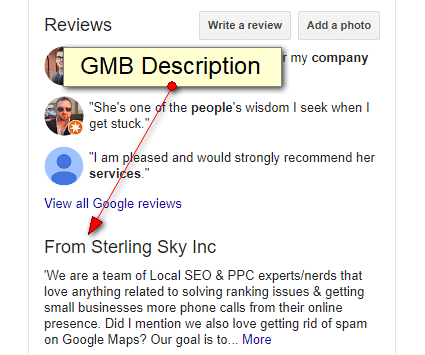
Hooray! Google My Business descriptions are back

Google My Business (GMB) recently brought back the business description field, which has caused those of us working in the local search industry to say “hooray” and raise eyebrows.

Here are a few things you should know about the description and some useful tips to help you make the most of this new change.

1. It shows at the very bottom of the Knowledge Panel

The visibility of the description is really poor, which makes me question how much effort to put into creating it.

It shows below the address, below questions and answers (Q&A), below Google Posts and below customer reviews. Because its visibility is poor, I would suggest utilizing Google Posts for messages you want to be right in front of your customers’ eyes.

2. It does not replace the editorial summary

Editorial summaries are the small descriptions that appear at the top of the Knowledge Panel for popular businesses. Not all businesses have these; they are manually written by Google and cannot be altered. Businesses that have editorial summaries can still add the GMB description. It will show above the Knowledge Panel.

3. GMB descriptions are no-shows on Google Maps or Google Maps app

Google My Business (GMB) descriptions do not show up on Google Maps on either browser or the Google Maps app. They only appear in Google search when the Knowledge Panel is visible. Editorial summaries, on the other hand, show in both.

4. Guidelines for the description

The GMB guidelines clarify what types of content you cannot include, such as obscene or sexually suggestive or content related to the sale of illegal products and services.

If you add content that violates the guidelines, you’ll find that when you try and save your description, Google will highlight the entire section in orange to signal it’s being removed.

5. Character limit: 750

You are given 750 characters to work with, but the first 250 are what shows in the Knowledge Panel. After that, the content is cut off, but it’s still in your GMB description. The decrease in characters from the previous 4,500 to 750 was probably done to cut the amount of spam showing in the descriptions.

6. The description field probably does not impact ranking

It’s too early to say for sure, but so far, we haven’t seen any major upticks in ranking for keywords highlighted in the description field. Instead of shoving as many keywords as possible in the description, I would focus on highlighting the unique selling proposition (USP) of the business.

7. Bonus tip

Use the text from your best-performing AdWords ad as inspiration in your Google My Business descriptions.

As Google continues to try and offer more information directly in the search results for businesses, it’s becoming more vital for businesses and marketers to measure traffic and calls from Google My Business in addition to Google Analytics.

We’re seeing a movement toward conversions happening off the website, and I think this will be a growing trend as Google continues to add more features like this. Features like the Google My Business description make it so a customer doesn’t even have to go to the website to get the information needed to make a purchase decision.

The post Hooray! Google My Business descriptions are back appeared first on Search Engine Land.

Google involved in Supreme Court case that may change class-action damages awards

The underlying facts have nothing to do with the reason a case involving Google is now before the US Supreme Court. It has to do instead with an arcane legal doctrine (cy-près) that awards damages to charitable causes or entities when it’s difficult to compensate plaintiffs.

In 2010, Google was sued because the company allegedly violated its privacy policy by “leaking” personal information in referrer headers that were passed to third-party websites after users clicked on links in search results. Google settled the litigation in 2013 for about $8.5 million.

What’s at issue in the Supreme Court case is how the settlement was allocated. The money was slated for several law schools (Harvard, Stanford and Chicago-Kent) and organizations involved with privacy issues, including the World Privacy Forum and the MacArthur Foundation. At the time, US District Judge Edward Davila expressed concern that the plaintiffs’ attorneys were steering money to their own law schools.

Now, critics of the settlement, led by the conservative Competitive Enterprise Institute, argue it “violated procedural rules in US law requiring settlements to be fair, reasonable and adequate,” according to Reuters.

The US Ninth Circuit Court of Appeals approved the settlement because the roughly 129 million Google users implicated would have received less than 10 cents each under its terms. Accordingly, the cy-près doctrine was invoked to give the money to groups and institutions doing privacy-related work.

The Supreme Court will determine whether this particular settlement will survive. But in the process, it will also clarify when cy-près may be invoked and what federal settlement-related procedural rules require in terms of compensating plaintiffs in class actions.

The post Google involved in Supreme Court case that may change class-action damages awards appeared first on Search Engine Land.