Tuesday, April 3, 2018

Four ways to remain productive when the AdWords interface changes

The new AdWords interface is creating quite a stir in the PPC industry because, while it’s pretty, it’s disrupting the work of lots of PPC professionals. Like Mona Elesseily says, “this is a workhorse for many of us, not a viewing platform.” Fortunately, advertisers who use third party tools like Optmyzr have a chance to transition their workflows more gradually than those who rely entirely on the tools Google provides.

At Optmyzr, we know that our PPC optimization software must do two things really well: save time, and improve performance. Over the years, we’ve learned that achieving these goals requires different interfaces for different account managers. In other words, one solution does not fit all.

Because so many Optmyzr users are experts who do PPC for a living, the tools tend to have lots of ways to tweak things based on individual strategies. But even users who leverage all the customizations sometimes just want a prebuilt solution that leverages the wisdom of the entire industry. Time is often their most constrained resource, so choosing which tool to use is about optimizing time efficiency and gains in performance.

Optmyzr recognizes that account managers have limited time and will make informed decisions about which workflow is best for each scenario. Here are four ways Optmyzr gives account managers more choice about how to optimize their own time while still driving improvements in PPC on AdWords and Bing Ads.

Go broad with quick win optimizations

As much as PPC Pros might want to spend a few hours to make an account perfect, the reality is they are pulled in many directions and it can be hard to devote more than five minutes to an account at a time. Luckily, small improvements can still pay off handsomely if they are done frequently.

In AdWords, a quick win might consist of tackling one of the suggestions in the Recommendations section (known as the Opportunities tab in the old interface).

There are several third-party tools that follow this quick-win strategy from Google. At Optmyzr, we recently launched Optmyzr Express to give advertisers access to more quick wins and we added an easy to use inbox-style format.

This makes Optmyzr Express really fast, because our algorithms find new suggestions every day. When an account manager logs in, all the data is already cached and ready for instant action.

The optimizations are also very focused, so rather than going deep and fixing everything, it prioritizes the highest impact changes, making it very easy for the user to see everything that will be changed in the engine as soon as they click the “approve” button.

Go deep with One-Click Optimizations™

The second strategy is useful when a bit more time can be devoted to an optimization and it’s possible to go deeper and fix a bigger portion of an account. Whereas quick wins need to be focused on the highest priority opportunities, a deep dive based on a statistical approach can fix every opportunity, regardless of size. In AdWords this might entail downloading several reports with all account data, combining them in Excel, and creating an AdWords Editor-compatible file with the necessary changes.

A tool like Optmyzr automates all these steps and can analyze hundreds of thousands of search queries for an account and do things like automate the creation of single keyword ad groups (SKAG) for the most promising terms.

This was the original type of Optmyzr workflow, the One-Click Optimization™. We learned that as much as an algorithm can point to the validity of a certain suggestion, there are just some things that are easy for humans to pick out that algorithms have a really hard time with.

For example, an advertiser might scan a list of keyword suggestions and remember they already tried these in another account a long time ago, or that certain keywords contain competitor names and there was a recent internal policy change about what to do with these types of keywords.

Unfortunately, those things that a human can pick out very easily are often highly dependent on the vertical, or even the advertiser’s own internal policies, so it’s hard to automate it in a piece of software. So even though statistical optimizations are equally fast at generating one or a thousand suggestions, the time for a human to review the changes scales linearly.

Rather than trying to build the perfect algorithm, something that would be virtually impossible, we deploy optimizations that save time by doing all the pulling of reports, doing all the math, and all the analysis, and we leave the final step in the user’s hands.


Go deep and broad with optimization checklists

The two previous scenarios have covered options designed for when time is severely limited. But what’s the best workflow when that limitation isn’t there? Agencies sometimes have employees whose primary job is to run through optimization checklists and they tend to have more time than someone who also needs to run client meetings. They could spend a ton of time in AdWords or do things more quickly with Optmyzr’s One-Click Optimizations™, but we find that’s often not conducive to reliably high quality results.

The reason is that account managers dedicated to optimization are often newer employees who may not have the same level of AdWords skills as their counterparts who are client-facing. For them, it can be confusing to know what to do when faced with advanced interfaces like that of AdWords or Optmyzr. Knowing exactly where to click, what columns to turn on, what date ranges to select, and how to combine multiple reports to do a proper optimization is no simple task, so it may not be done consistently right.

That’s why Optmyzr developed Account Workouts, a customizable PPC workflow.

With Workouts, advertisers can add deep dive optimizations to a to-do list. The benefit of using Optmyzr rather than a generic to-do list is that it’s deeply integrated with the PPC engines. When the account manager goes through the tasks of a Workout, they are presented with the right optimizations, in the right order, with the right settings for the strategy defined by the account owners, and the right columns are shown to help inform the final decision on which suggestions to accept.

Go on vacation by putting AdWords on auto pilot

Finally, what about the scenario where we have literally no time, perhaps because we’re eager to take that long-awaited vacation. That’s where AdWords Scripts come in. We’re big fans of PPC automation at Optmyzr, but, as we said before, some automations are risky because it’s hard to build an algorithm that picks up on every nuance of a business, the way a human easily would. That said, there are plenty of PPC tasks that really don’t need that final layer of human approval since the task is so clear cut.

Take budget management for example. The business strategy may inform some of the complicated decisions about where to allocate budgets, but once the strategy is locked down, the task of making sure budgets are spent correctly is mostly a matter of checking the account spend frequently and rebalancing budgets as needed. That’s entirely automatable.

For these types of tasks, AdWords Scripts are ideal. They can check an account every hour and take the appropriate actions, whether that’s sending an email about a keyword with runaway spend, pausing a campaign that has depleted its monthly budget, or generating a back-office report about performance of the different keyword match types.

Optmyzr’s co-founder, Fred Vallaeys has written several free scripts that you can find on this site and Optmyzr also maintains the freeadwordsscripts.com blog. Anyone looking for an even easier way to get started with scripts can use Enhanced Scripts which require no knowledge of programming whatsoever.

PPC Pros need different ways to optimize accounts, depending on how much time they can devote to the task at hand. That’s why Optmyzr has created a variety of workflows to help account managers be more effective at their job. During this period of transition where legacy workflows anchored to the old AdWords interface will have to be updated, we hope to provide advertisers another option to remain productive.

The post Four ways to remain productive when the AdWords interface changes appeared first on Search Engine Land.

Monday, April 2, 2018

Google’s Ben Gomes expands role to head all of search amid leadership shuffle


Reported today in The Information, Ben Gomes, the current VP of Core Search at Google will be stepping up to lead all of Search as Vice President. This move is the result of John Giannandrea, SVP of Engineering overseeing both the search and AI units, stepping down. The single role previously held by Giannandrea is being divided between Gomes, who will oversee search, and Jeff Dean, currently Google Senior Fellow overseeing the Google Brain team. Dean will now oversee both Google Brain and the AI unit at Google. Both Dean and Gomes are long-time veterans at Google (19 years and 18 years, respectively).

It cannot be overstated how instrumental Jeff Dean’s 19 year history with Google has been in driving the search giant’s success with its core product. While at Google, Dean has:

  • Co-designed five successive generations of Google’s crawling indexing and query retrieval systems
  • Co-designed the initial version of Google’s advertising serving system.
  • Co-designed and implemented MapReduce
  • Co-designed and implemented BigTable
  • …and Google Translate, Google AdSenese for Content, Google News, Spanner…etc.

Ben Gomes has been an integral part of the Google Search team for 18 years. There’s not a part of the core search algorithm that he has not been involved with, intimately. He’s been a key engineer on the team as well as being described (by former Googler Marissa Mayer) as both their “search czar” and “diplomat” — as he easily communicates search development across the teams at the ‘plex and externally. Overseeing all of search will be a natural fit for him and the teams he’ll lead.

Giannandrea was in the dual role for the past two years, taking over the search role when Amit Singhal stepped down. Giannandrea joined Google in 2010 as part of its acquisition of his company Metaweb technologies – which contributed to the development of Google’s Knowledge Graph. Giannandrea’s background in machine learning and AI combined with Google’s emphasis on AI-first search made him a natural fit for the role at the time. According to The Information report, he’ll continue on at Google. His background emphasized research and I’d speculate his involvement in the Natural Language Understanding team will grow as voice-first and AI-first paths merge ever closer at the search giant.

We’ve reached out to Google for comment and while confirming the the changes also confirmed there are no additional movements within the core search team planned at this time.

The post Google’s Ben Gomes expands role to head all of search amid leadership shuffle appeared first on Search Engine Land.

SearchCap: SEO angles, mobile conversions & April Fools’ Day pranks

Below is what happened in search today, as reported on Search Engine Land and from other places across the web.

From Search Engine Land:

  • April Fools’ Day 2018: Google, Amazon & more have fun over the weekend
    Apr 2, 2018 by Barry Schwartz

    April Fools’ Day 2018: Google, Amazon & more have fun over the weekend

  • Lowest rates for SMX Advanced expire Saturday
    Apr 2, 2018 by Search Engine Land

    If you’re craving a conference that skips the basics and dives right into the deep end of search marketing, look no further. Search Engine Land’s SMX® Advanced is coming to Seattle June 11-13. This conference has sold out every year for over a decade, and Super Early Bird rates expire this Saturday night. Book now […]

  • The power of podcasting: SEO keyword angles
    Apr 2, 2018 by Sherry Bonelli

    In Part 2 of a three-part series, Contributor Sherry Bonelli dives into the details of optimizing a podcast for maximum SEO, link and brand-building benefit.

  • 7 ways to increase mobile engagement
    Apr 2, 2018 by Kristopher Jones

    The mobile search economy continues to explode. Contributor Kristopher Jones outlines several messaging and alternative marketing strategies to improve your mobile conversion rates.

Recent Headlines From Marketing Land, Our Sister Site Dedicated To Internet Marketing:

Search News From Around The Web:

The post SearchCap: SEO angles, mobile conversions & April Fools’ Day pranks appeared first on Search Engine Land.

April Fools’ Day 2018: Google, Amazon & more have fun over the weekend

Yesterday was April 1, also known as April Fools’ Day, and although it was a Sunday and most folks were not working at Google, Amazon and other companies, there were still April Fools’ Day pranks to be had.

Google Maps ‘Where’s Waldo?’

Google Maps posted a “Where’s Waldo?” game within Google Maps on Android, iOS and desktop.

Google Search Console Recrawl Now button

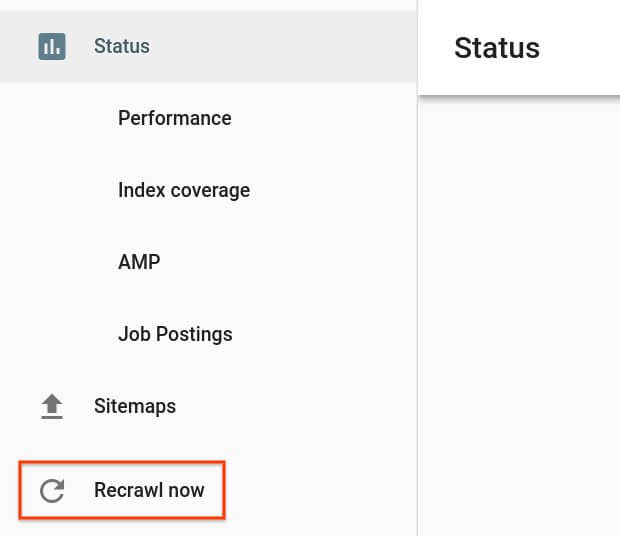
Google Search Console, the beta version, added a “recrawl now” button that led to a Rick-Roll: Rick Astley — Never Gonna Give You Up (Video). This plays on the new limitations with the fetch as Google and submit to index feature.

Google bad joke detector

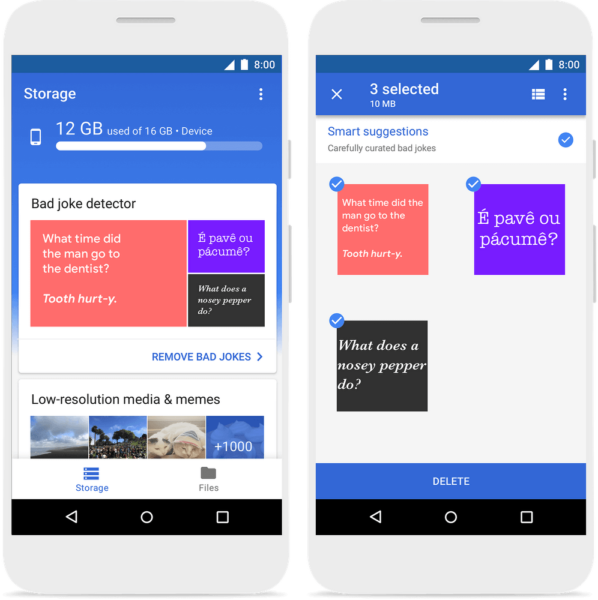
Google also launched a Bad Joke Detector that they called no laughing matter. Google said, “Using a custom-built deep neural network, Files Go can scan your smartphone for jokes with your permission, identify the bad ones and delete all of them with a single tap, freeing up space for more important things — like better jokes!”

Power sources for Chromebooks

Chromebooks now support alternative power methods such as wind power, solar power and compost power. “Chrome OS team had a few sparks of creativity to generate renewable ways to keep your Chromebook running anywhere,” Google wrote:

Google Cloud Hummus API

Google Israel launched the Google Cloud Hummus API. Google is enabling their customers to address senses through Speech & Vision API, they are now releasing a subset of Taste APIs started with a dish we all love:  hummus. Here is a video of how that works:

Google Gboard Physical Handwriting

Google Japan introduced Gboard Physical Handwriting version. Gboard physically handwritten version extracts the feature quantity in the image generated from the sequence input by the built-in processor equipped with the character discriminator by the separation type convolution neural network by the USB keyboard and outputs the inference result to an arbitrary device by bluetooth. Here is a video showing it off:

Google rebranded to Googz

Google wrote, “Starting today on April 1, you’ll see this new brand identity out in the wild — in Pyrmont and in our products. Just ask your Google Assistant ‘Ok Google, What’s your name?’ on your Google Home device or Assistant enabled iOS and Android phone.”

Amazon author delivery service

Amazon wrote, “Launching April 1st, Amazon Publishing will deliver your favorite authors to your front door. Watch as bestselling author Patricia Cornwell does whatever it takes to arrive on time. Who will you request?” Here is a video of it:

Netflix acquires Seth Rogen

Netflix announced they had acquired the actor Seth Rogen. “World-renowned Canadian person, prolific marijuana-doer and winner of the 2015 MTV Movie Award for ‘Best Kiss,’ Seth Q. Rogen has entered into a lifetime deal to transfer full ownership of his personal autonomy to Netflix, Inc.”

Snapchat Russian filter

Snapchat unveiled a photo filter that pokes fun at Facebook around Russian bots liking your posts. The Verge explained the filter places a Facebook UI around your photo with Cyrillic script-like text and even includes likes from “your mum” and “a bot.”

The post April Fools’ Day 2018: Google, Amazon & more have fun over the weekend appeared first on Search Engine Land.

Lowest rates for SMX Advanced expire Saturday

If you’re craving a conference that skips the basics and dives right into the deep end of search marketing, look no further. Search Engine Land’s SMX® Advanced is coming to Seattle June 11-13. This conference has sold out every year for over a decade, and Super Early Bird rates expire this Saturday night. Book now to secure your seat and enjoy serious savings!

Your All Access pass unlocks the complete SMX Advanced experience, including:

If you’re already planning to join us for SMX Advanced, do your wallet a favor: Register now and enjoy $500 in savings! This is the absolute best price we can offer for All Access passes. Seize your opportunity today.

Psst… Don’t forget to join us for the 4th annual Search Engine Land Awards! Celebrate the power of search with your community at Seattle’s Museum of Pop Culture. All Access attendees are welcome, and we’d love to see you there!

The post Lowest rates for SMX Advanced expire Saturday appeared first on Search Engine Land.
The power of podcasting: SEO keyword angles

This is Part 2 of a three-part series. Part 1 can be found here.

Once you are booked on a podcast, brush up on the host’s website, bio and about page.

Listen to recent podcast episodes so you can get a feel for the types of questions being asked, learn a little bit about the host and ask about audience demographics. You have an opportunity to speak with someone who is going to listen to you for 20 or 30 minutes of their time — you must make an impression!

Before the podcast interview, the host or one of their representatives will typically contact you to chat about what they want to cover on the podcast. If they don’t reach out to you, you should contact them and ask if you can schedule a time to talk about what they would like to discuss on the show.

Some will want the interview to be organic and won’t share the angle they are planning to focus on; some will strategize your interview so that you both can tailor a message that will best help the podcast audience.

As an example, when I was interviewed on Phil Singleton’s podcast, The Local Business Leaders Podcast, we decided I would talk about local search engine optimization (SEO). But as we talked, we also decided I would talk about a local SEO success story I had with a client who was an attorney. That gave both of us an angle for the podcast, and through our discussion, we’d get attorney SEO-related keywords that would be included in the transcript of the episode.

Remember, the audience trusts the show host, so as a result, you get an automatic “seal of approval.” And remember, the entire show is dedicated to you! You’re the person of the hour, and it’s costing you nothing but your time. SWEET!

Think SEO during the podcast interview

Prepare for the interview by brainstorming and writing down a list of keywords, influencers, companies, blogs, universal resource locators (URLs), books, etc. that pertain to the topic of the show and keep that sheet of notes handy so you can refer to that list and use those examples throughout the interview.

As you are being interviewed, think of how you can use those keywords naturally during the conversation with the host. If you mention links, make a quick note and be sure you provide the direct link to the host after the interview, so they can add them to the show notes.

When you’re talking, speak to their main audience. Now, like many speakers, you may use similar examples in almost every interview or presentation you give, but tailor those answers to meet the audience’s interests. Remember to teach and share your best information; don’t pitch your services. You’re there to teach, not sell your products or services.

Mention what you admire

During the interview, mention books, influencers or other companies you admire or like to work with. You can use these types of people and companies as examples.

Once the podcast is uploaded and available to the public, you can promote the podcast on social media.

Be sure to mention the influencer, his or her company, software or book on social media. You’ll likely get kudos or a thank-you for mentioning these people or companies. Just make sure you don’t sound like a sales pitch when you’re a guest on a podcast. Remember, you’re only there to share information, not to sell.

Use names, companies and keywords and examples naturally throughout the show, just as you would if you were writing an article.

Keep an SEO mindset

Throughout the interview, keep an SEO mindset. Think carefully about the words and phrases you are using. The content and information you share in the show will benefit you in multiple ways, so try to be strategic in what you say.

During the podcast interview, be very purposeful in how you mention your website or business. Don’t talk about your business too much. At the end of the show, the host will usually give you an opportunity to mention something about how people can learn more about you and your business. This is the time to mention your URL and work in a call to action (CTA) for a special offer only available to podcast listeners.

Plan ahead: Set up a special page on your site with an offer, pixel visitors and capture names and email addresses and give them something awesome in return.

Make your offer redeemable only on your site.

SEO benefits after the podcast

Once you’re done with your guest interview, you’ll breathe a sigh of relief and feel really good!

Don’t forget to send the host an email thanking them for having you as a guest, and be sure to provide the host with all the links you mentioned during the show.

Reach out to those influencers, let them know you shared their websites and books in your podcast, and then leave a link to the podcast. Many will share the podcast link with their fans and followers.

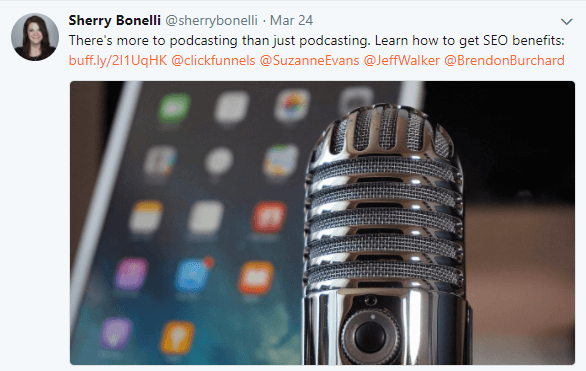
Getting these shares is just one more way to amplify your SEO benefits through social media. Be sure to social tag these people when you make your social media post like this:

You can also send them an email or direct message them on social media as well.

After the podcast recording is done, the host is going to do most of the work to promote the recording, driving people to visit your site so they can find out more information about you. However, you will also want to do your part to share on your social media channels as well. This cross-promotion between you and the podcast will benefit everyone from a search and social perspective.

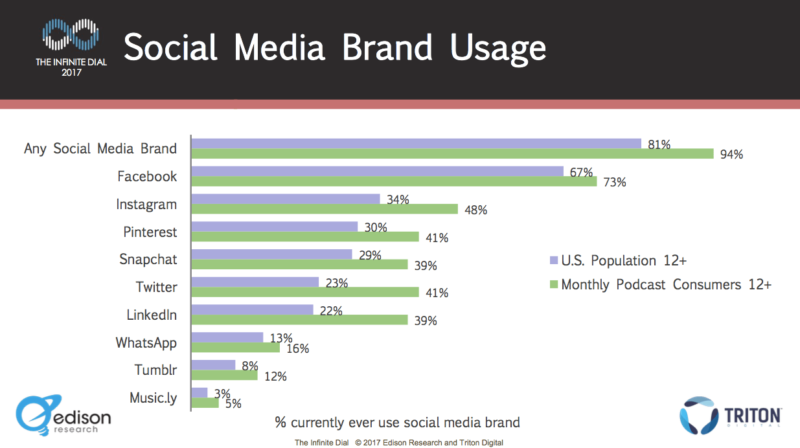
Since podcast listeners are more active on social media, you can use that to your advantage to promote your podcast guest interview through your social media channels. This gives you a huge, well-rounded digital marketing strategy to help promote your podcast interview.

Links and asking for reviews

At the end of the show, be sure to send the podcast host a list of the links you mentioned during the interview, so they can easily put them in the show notes.

It’s been shown that Google considers online reviews in their ranking factors. At the end of every show, send an email, politely ask the host for a review based on your knowledge during the podcast interview, and offer to leave them a review on iTunes as well. This will lead to new reviews that can help you with rankings and credibility. The podcast host will be thrilled that you’re leaving a review for them as well.

Leaving great reviews may help you land more guest spots, so be sure to leave a review that is fair, informative and lets others know you are available as a podcast guest.

This ends Part 2 of our three-part series: SEO and podcasting. In Part 3, we’ll learn how to build personal and brand authority with podcasts, look at how podcasts generate backlinks and discuss how to transcribe audio files for more SEO-rich content. Stay tuned!

The post The power of podcasting: SEO keyword angles appeared first on Search Engine Land.
7 ways to increase mobile engagement

Mobile users have traditionally been surfers rather than shoppers. According to one study from Monetate, mobile conversion rates are still less than half of desktop conversion rates.

Source: Monetate EQ4 2017

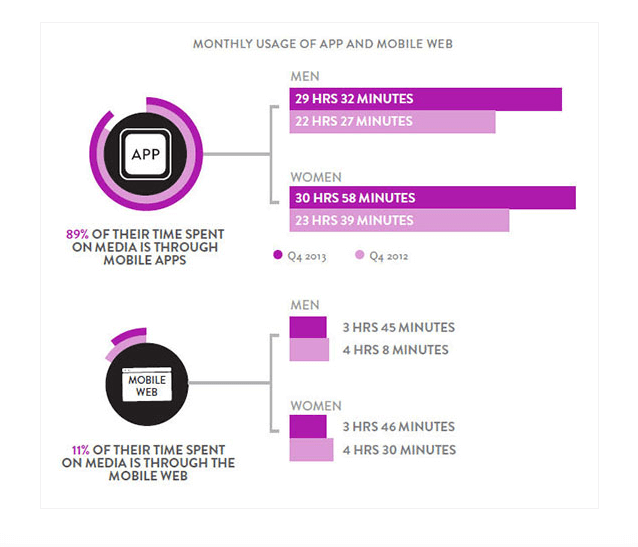
Yet, though there’s an opportunity for e-commerce websites to increase their online sales through mobile, barriers do exist. Mobile checkout is less convenient than it is on desktop, and a majority of mobile consumption occurs in apps rather than websites.

Source: Nielsen Insights

With the mobile-first index finally arriving and voice search continuing to climb in popularity, now is the time to re-optimize your mobile e-commerce strategy to improve your bottom line. Let’s explore some ways you can improve your mobile conversion rate.

Prioritize speed

Google recently announced that mobile page speed would become a ranking factor in July of 2018. Page speed is essential to your user experience and bounce rate.

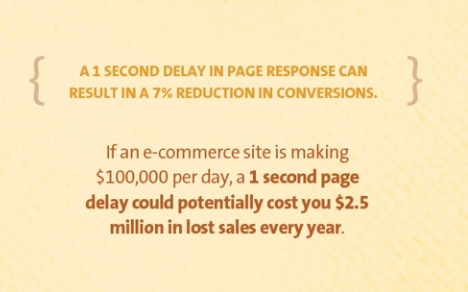
According to Kissmetrics, a one-second delay in page speed could decrease your conversion rate by 7 percent.

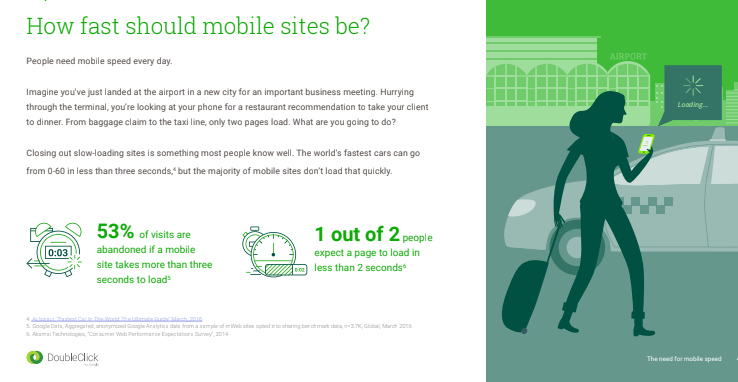
DoubleClick even released a report that found that 53 percent of users will bounce from a mobile site that takes more than three seconds to load.

The first step to improving your mobile page speed is to implement a mobile-optimized web design. This could include creating a separate mobile domain, responsive web design (RWD), a progressive web app (PWA) or Google AMP code.

But implementing responsive web design is not enough. According to Kissmetrics, pages with RWD still take anywhere from six to 18 seconds to load, on average.

Here are some easy steps to reduce your mobile page speed:

  • Minify JavaScript and cascading style sheets (CSS).
  • Enable caching.
  • Implement accelerated mobile pages (AMP) code.
  • Optimize images to smaller pixels and the .jpeg format.
  • Reduce server response time.
  • Reduce navigation and redirects — leverage the long scroll.
  • Load above-the-fold content before below-the-fold content.
  • Eliminate pop-up ads.
  • Enable gzip compression on CSS and Hypert Text Markup Language (HTML) files.

Be sure to regularly test your page speed to uncover whether any new content or changes to your site have slowed down your site. Google’s Page Speed Insights will provide you with a page load-out time, which will help you determine whether any further investigation is warranted.

Improve checkout

One of the main reasons people avoid making purchases over mobile is because the checkout process can be quite cumbersome. Besides having to type in credit card information using public WiFi with tiny keys, navigation becomes a huge issue.

One way to route these barriers is to provide customers with the option to switch devices. Technically, this will not increase your mobile conversion rate, although you can chalk it up to your mobile efforts in attribution.

Another way to encourage payments over your mobile website is to integrate payment services which are trusted and secure, such as PayPal.

Primarily, you should attempt to limit the number of clicks it takes to reach checkout. This is one of the advantages of a mobile landing page. For your home website, a checkout should contain payment information, address and so on, all on one page, and make checkout and taps-to-action as painless as possible.

Scale down content and images

First things first: Optimize your content management system (CMS) to serve specific content for mobile users.

This doesn’t entail writing entirely new content; it requires adjusting meta tags and content length for mobile consumption.

Write shorter headlines that are more likely to attract user attention through their social news feed or on a mobile search engine results page (SERP).

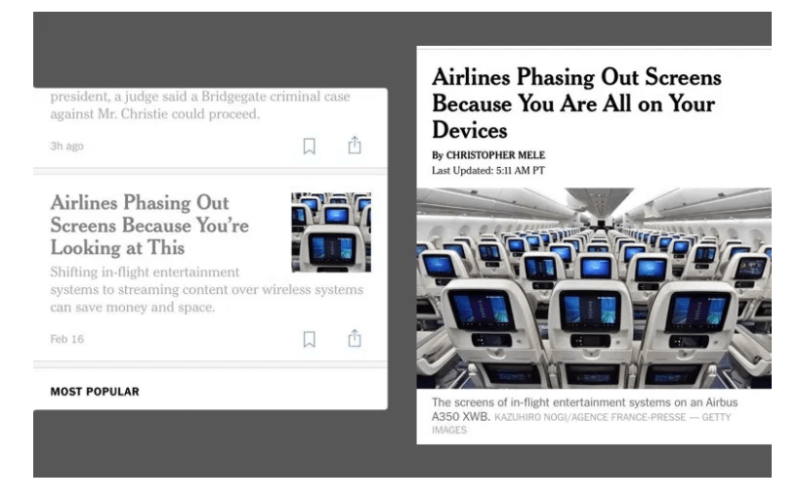
Provide clear call-to-action (CTA) phrases that are shorter, and leverage more power words. For example, here is an interesting experiment The New York Times ran to test different headlines for mobile and desktop users:

One way to organize content on your website is by using modular design. Essentially, modules are different pieces of your website, such as blog content, shopping carts, that can be selectively placed on different parts of a webpage.

Modules are easier to maintain and adjust than templates. Many websites make use of the card-based modular design, the most notable being Pinterest.

Optimize messaging for mobile

Do your research on consumer behavior and habits over mobile. Mobile devices are much more than a device for shopping or Googling information to outsmart your friend; they’re part of many people’s identity.

Segment your content by channel and the format that you produce it on. When you do, keep in mind that half of all video views are seen on mobile devices.

You also need to adjust your text ads for mobile to acquire more clicks.

Source: Wordstream

Provide compelling benefits with simple descriptions. Most people don’t even scroll through mobile results, so you already have a huge competitive advantage over other search and ad listings.

Calls to action with tactile reactions

It’s imperative that you include a call to action above the fold of your mobile webpage. I’d also consider expanding the size of the button in order to make it more visible to customers.

But it’s equally important to provide visual responses to each completed action on your website. Mobile users may think your website or their smartphone is not working correctly if you don’t provide a tactile response to a click or action.

Consider providing a rewarding microinteraction (a visual response a user sees after performing certain actions) to improve your mobile user experience; just don’t let the microinteraction affect page speed.

Take mobile offline

According to research from Deloitte, digital interactions influence 56 cents of every dollar spent in brick-and-mortar establishments, and a whopping 93 percent of Americans use their smartphones while shopping.

This provides a prime opportunity to connect with prospective customers in your store to improve service. This could include setting up scannable quick response (QR) codes for products, offering customers the ability to calculate savings, or even providing advertisements to customers in your store for discounted products. This serves as a great opportunity to significantly extend your brand in the eyes of your customers.

Remarket with SMS and push notifications

Finally, use mobile device capabilities to remarket to customers through push notifications and short message service (SMS) messages.

Use push notifications to advertise time-limited promotions to people every so often. This can even be used to drive ads to people if they’re near your business, using location-based tracking.

To truly elevate your potential to convert leads, leverage urgency and fear of missing out (FOMO) within your notifications. This could include time-sensitive promotions or buy one, get one (BOGO) free offers.

Conclusion

The mobile search economy continues to grow and take over search. Unfortunately, mobile search and advertising are fairly limited by the devices themselves. This means you need to re-optimize your strategy using different messaging and alternative marketing strategies to improve your conversion rate.

The post 7 ways to increase mobile engagement appeared first on Search Engine Land.