Thursday, March 29, 2018

No search volume? No problem! 3 ways to improve low-traffic AdWords campaigns

Search volume is the foundation of most successful AdWords campaigns. After all, if you’re bidding on a keyword that gets 10,000 searches per month and you have a 5 percent click-through rate, a 10 percent conversion rate and a 20 percent close rate, you can expect to close 10 sales a month from that keyword.

Better ad copy, landing pages or sales tactics can improve those numbers, but at the end of the day, you only have 10,000 searches per month to work with.

Now, if your keyword happens to get thousands of searches per month, that’s not a problem, but what if the keywords you want (or need) to target only get 100 searches per month?

All of a sudden, a 5 percent click-through rate, 10 percent conversion rate and 20 percent close rate means you get one sale from that keyword… a year.

And that’s if you’re running an effective campaign on a keyword that gets a hundred searches a month. In many low-search volume campaigns, you could be running an unproven campaign on keywords with fewer than 20 searches a month!

So, if you are a niche business or want to get clicks out of high-value long-tail keywords, what do you do? Quit? Give it your best shot and pray something will eventually pan out?

Fortunately, if you’re dealing with low-traffic keywords, quitting or throwing spaghetti at the wall and hoping something sticks aren’t your only options. In this article, we’re going to look at three different ways to handle low-traffic situations.

1. Use broad match

If you’re bidding on keywords with large search volume, broad match is a great way to waste a lot of money.

For example, we once audited an AdWords account for a company that implemented system application products (SAPs). Both they and their customers used the term “sap” all the time, so they targeted the keyword “sap.”

Now, the keyword “sap” alone gets about a million searches a month, but when they made a keyword broad match, their ads were showing up for every search you can imagine. Among the countless irrelevant search terms, they received hundreds of thousands of impressions (and hundreds of clicks) from people who searched for “A$AP Rocky” — an American rapper.

Unfortunately, keywords with large search volume tend to confuse Google. I mean, just look at what the Keyword Planner suggests as related terms for “sap”:

It’s like Google is saying, “I don’t know what you’re looking for here, so here’s a bit of everything!”

The lower search volume a keyword has, however, the more specific it tends to be. More specific searches are a lot easier for Google to interpret and match to other similar searches.

For example, here are some of the keywords Google suggests when you plug “sap deployment” into the Keyword Planner:

This keyword only gets 140 searches per month, but Google’s suggestions are right on the money.

Searches like “sap implementation services” are a perfect fit for what the business is looking for, and while they might not get a ton of search volume, they increase the total number of relevant searches that this business’s ads will show up for.

When you’re dealing with low search volume, broad match can often be a great asset. Low-search-volume keywords tend to be specific, so broad match can do a great job of getting your ads in front of additional low-volume searches that you may never have considered before.

To make things even better, after you’ve run your broad match keywords for a while, you can go into your Search Terms report and see if Google has uncovered any gems you should add to your campaign (or money wasters you need to add as negative keywords).

Obviously, this approach isn’t quite as efficient as targeting a high-search volume keyword using exact match, but using broad match can help you get several hundred to thousands more relevant searches a month out of a highly targeted low-volume keyword.

2. Prime the pump

Sometimes, the reason your keywords have low search volume is that people don’t think to search for what you’re selling.

This is especially true for businesses with new, innovative products or niche companies with very small potential audiences.

In these situations, it’s usually a good idea to start by focusing a little higher up the funnel. If no one has ever heard of a “sleep inverter,” why would people be searching for it?

Instead of waiting for people to discover your product, service or business at random, it’s a good idea to be a bit more aggressive with your marketing. Paid social, display and video advertising are great ways to spread the word and build awareness and demand.

All of this is Marketing 101, but here’s where we can get a little tricky with AdWords.

New or niche products and services often have a warm-up period. Unfortunately, most people won’t see a Facebook ad for a “sleep inverter,” click on it and immediately buy, especially if it’s expensive (which most new or niche things are).

Instead, most people will need some time to think about what you’re selling and do a little research before they’re ready to buy. A good display or video retargeting strategy can help here, but if you really want to snag someone who is thinking about your product, it pays to use remarketing lists for search ads (RLSAs).

Using RLSAs to access more search volume

Odds are, if you’re selling something niche or new, there is a “normal” that you are disrupting. Under most circumstances, if someone is searching for that normal, they won’t be interested in what you’re selling.

For example, if you’ve invented a “sleep inverter” bed alternative that helps with back pain, it might be hard to convince people who are searching for “best mattress” to click on your ad. They’re not looking for a “sleep inverter,” they’re looking for a mattress!

However, someone who’s already clicked on one of your “sleep inverter” display ads and is researching “best mattress” has a good chance of clicking on your search ad and potentially making a purchase. After all, they already know what your product is, so connecting your “sleep inverter” to their search for “best mattress” may be just the push they need to buy.

RLSAs allow you to juggle these two competing priorities.

Instead of trying to compete with the “normal” products or services you’re trying to disrupt for customers who don’t understand you or what you’re selling, you can instead run a very low bid campaign on “normal” keywords and then use RLSAs to dramatically increase your bid when someone who has already visited your site or landing page searches for those terms. That way, you can keep your new-and-improved option in front of potential customers without having to compete for people who just aren’t ready yet for what you’re selling.

Essentially, this tactic gives you a way to get around your low-traffic keywords by using RLSAs to access larger-search volume keywords without attracting irrelevant clicks.

3. Combine and conquer

As mentioned above, low-search volume keywords are typically also highly specific keywords. This can create real problems when it comes to optimizing your ad copy.

To get clicks, specific searches need specific ad copy, so if you want to make the most of the few searches you do have, you need to write ad copy that closely matches the search terms and search intent of your low-traffic keywords.

Unfortunately, it’s hard to evaluate your ad copy when you only get 10 clicks a month, so unless you write the perfect ad copy the first time, you may miss out on potential clicks, conversions and sales without even realizing it.

However, there is a way to test ad copy on low-traffic keywords. You just have to be clever about how you put your ad copy together.

Odds are, even if the specific keywords your target audience uses are different, their pain points are basically the same. With this in mind, you should be able to write ad copy that ties the keywords and pain points together in a fairly formulaic way.

And, if your ad copy is basically consistent, you can give all of those ads the same label in AdWords and use that label to aggregate your ad performance across all of your keywords in the Report Editor.

Once you’ve picked your ad label in the Report Editor, all you have to do is pick the metrics you want to evaluate, and Google will show you bulk data for your ad copy. It’s not a very scientific way to do things, but it’s a great way to get a feel for how your ad copy is performing.

In addition, you can also use this same tactic to test two different sets of ad copy. All you have to do is label each version separately in your campaigns and run a labels report in the Report Editor.

Like the other tactics discussed in this article, this approach isn’t ideal, but when you don’t have enough traffic to do things right, it’s a handy trick to have up your sleeve.

Conclusion

While low-traffic campaigns can be a real headache to manage, you can still get good results from low-traffic keywords in AdWords. You just have to change your approach. Instead of doggedly trying to adhere to high-traffic “best practices,” you need to get scrappy and find ways to make the most of the traffic you do have access to.

In this article, we’ve discussed three different ways to make the most of your low-traffic campaigns, but there are a variety of other tricks you can try.

The post No search volume? No problem! 3 ways to improve low-traffic AdWords campaigns appeared first on Search Engine Land.

Bing Ads brand CPC taking the elevator — up


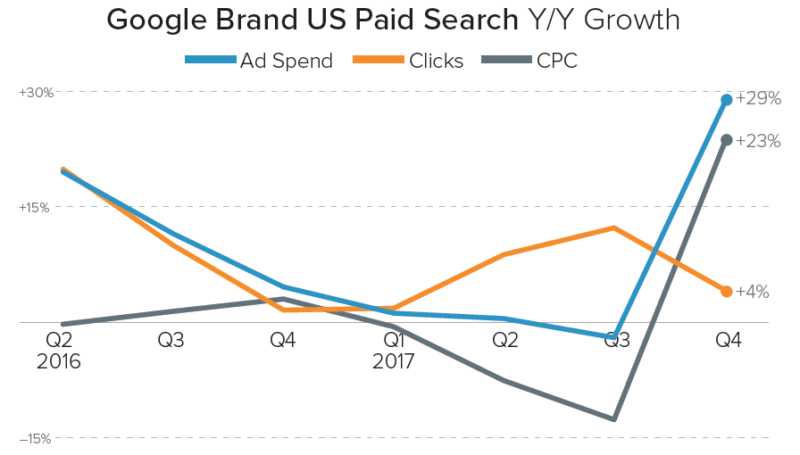
Just a few weeks ago, I wrote about the bizarre Q4 rise of brand text ad cost per click (CPC) on Google, following a Q3 in which brand CPC was actually declining.

This despite the fact that Google brand top-of-the-page and first-page minimum bid estimates continued to decline steadily through the end of 2017.

While this sudden reversal continues to be somewhat of a mystery, another brand cost-per-click trend continues to take hold on Google’s primary US-based competitor, Bing, where CPC growth has accelerated quickly over the past several months for unknown reasons.

The rise of Bing Ads brand CPC

Looking at year-to-year Bing Ads brand text ad growth for the median advertiser from a sample of long-standing Merkle (my employer) clients, we find growth started to accelerate in May 2017.

Unfortunately for brands, this acceleration carried on into the new year, with February year-to-year CPC growth at 42 percent.

Breaking CPC down by device, it appears that phones did see an increase beginning in mid-2017, but the rise on desktop and tablet devices has been much faster.

Desktop computers account for the vast majority of ad traffic on Bing, which struggles to compete with the default search engine status of Google on Android and iOS devices.

In February, 82 percent of all Bing brand text ad traffic came from desktop.

There were no major changes in advertiser strategy to explain this shift. The higher CPC trend does not appear to be tied to an update to the traffic coming from Bing’s syndicated search partner network, which typically produces cheaper clicks.

There was no meaningful shift in traffic aligning with the increase in CPC, though average position did move farther up the page — a trend that’s just as mysterious as the increase in CPC.

History of Bing vs. Google brand CPC

Comparing brand CPC across the two major search engines in the US, Bing Ads have been more expensive for the most part ever since paid search “became a thing.”

One exception came in Q2 2015, after several quarters of rising first-page and top-of-page minimum bid estimates for brand keywords on Google.

However, Google brand CPC fell back down relative to Bing in Q3 2015 and continued to trend below Bing.

While both engines saw meaningful brand CPC increases in Q4 2017, Google brand CPC has been between 28 percent and 36 percent lower than Bing since last May.

Options for advertisers moving forward

With no obviously related 2017 announcements seeming to align with the timing of the increase in Bing brand CPC last year, advertisers are left to deduce that some sort of back-end change resulted in the rise we’re still seeing.

Much like on Google, advertisers have limited options available to suppress brand CPC on Bing Ads, and most brands will continue to pay to keep ads at the top of the page even as the cost goes up.

That said, there are a few strategies worth taking a look at for those programs observing significant increases.

Holdout testing. In this scenario, advertisers pause brand ads to estimate the share of traffic and orders lost without brand ads present. Analyzing the impacts of these tests requires accounting for both paid and organic search traffic and orders, as well as other actions such as phone calls and brick-and-mortar transactions, depending on the type of business.

The impact of turning off ads to these measures can be difficult to measure, particularly for small brands with little data to go on, but it is necessary to understand in valuing brand traffic properly.

Results from such tests typically vary significantly from brand to brand and depend on factors like the presence of competitors, the brand’s organic presence and the strength of the brand’s name.

Some brands find almost no incremental gains attributed to continuing to run brand ads, while others find that a majority of the traffic and sales coming from brand ads would be lost without bidding on those terms.

A less drastic form of testing would be to slowly lower bids on brand keywords to estimate the loss associated with potentially falling off the page in some ad auctions because of lower bids. In some cases, brands might be able to decrease CPC with lower bids while experiencing only minimal declines in other metrics.

Ensure ad copy and extensions are optimized. Most well-managed accounts already have optimized ad copy and have tested multiple iterations to find the most effective messaging.

Still, it can be worth it to take another look and make sure there aren’t more effective ways to phrase things or more important selling points to call out.

Additionally, brands should make sure they’re taking advantage of all applicable ad extensions, such as sitelinks and location extensions.

Make sure brand keywords are set to exact match and monitor negatives. To prevent brand ads from showing for non-brand queries (which typically drive clicks at a higher CPC and don’t carry the same intent as brand queries), brand keywords should typically be set to exact match.

Further, because close variants allow queries which don’t exactly match the keyword targeted to trigger search ads, paid search managers will also need to keep an eye on search query reports to identify variations which are driving traffic but which don’t indicate the same brand intent as true exact matches.

The post Bing Ads brand CPC taking the elevator — up appeared first on Search Engine Land.
Is your SEO/SEM software tool or agency worthy of a Search Engine Land Award?

For the first three years of the Search Engine Land Awards program, we made a conscious decision not to include awards categories such as “Best SEO Software” or “Best SEM Tool”. The logic behind this choice had many layers, but among the top reasons:

  • Judging all tools individually would require access and significant time to evaluate tool features.
  • Tools and platform choices are inherently challenging for customers – budget, user seats, implementation needs, and so forth vary greatly across a wide scope of users, and selecting a limited few does a disservice to the community at large.
  • As an unbiased publication, we simply cannot endorse a “Top 10” or ultimate winner among the many useful tools available in the industry.

However, there is no denying that most of the SEO tools and SEM platforms available in the industry provide inherent value to both users and the community at large, whether you are an existing customer or prospective one.

That’s why for 2018, we decided to take our own innovative approach to this often requested award, by creating a category to recognize those software tools and platforms that are utilizing their extensive customer datasets to derive ground-breaking insights and actionable recommendations for SEO and SEM professionals to implement in their marketing efforts.

Similarly, there are many agencies – both small and large – as well as talented individual consultants, who have also published significant research findings based on client data, aggregated data from a variety of sources or used other mechanisms such as surveys. As such, there is a parallel category to recognize research performed from the consulting point of view.

What are we looking for?

Since these particular categories are new this year, we’ve left the requirements somewhat broad in nature. That means it’s fairly wide open as far as what can be submitted – the good news is, you or your team has already done the work to produce most of the required submission materials!

Both categories share the same entry criteria (full details linked below) – but our primary goal is to uncover innovative research that moves the search industry forward through proven hypotheses, quantifiable results and qualitative, actionable insights.  

Examples of qualifying industry research

This is by no means an exhaustive list, but they are general examples of the types of research reports and corresponding media we’re looking for in submissions.

If your SEO or SEM software or agency has conducted and published industry research between January 1, 2017 and March 31, 2018, then we want to hear all about it! It’s possible we missed it the first time around, and with this new level of recognition in play, we want to make sure all innovative findings get their time in the spotlight.

The FINAL deadline to enter the Search Engine Land Awards is April 13th, and we’ll be announcing winners at a special evening event during our annual SMX Advanced conference on June 12th, in Seattle. See all of the categories here and get started on your entries today!

The post Is your SEO/SEM software tool or agency worthy of a Search Engine Land Award? appeared first on Search Engine Land.

Wednesday, March 28, 2018

SearchCap: Bing Ads Editor update, Waze local ads & Google air quality

Below is what happened in search today, as reported on Search Engine Land and from other places across the web.

From Search Engine Land:

Recent Headlines From Marketing Land, Our Sister Site Dedicated To Internet Marketing:

Search News From Around The Web:

The post SearchCap: Bing Ads Editor update, Waze local ads & Google air quality appeared first on Search Engine Land.

To make every conversion count, count every conversion


Conversion measurement is complicated. More devices, channels and touch points mean that data is exploding, and yet cross-device behavior and the use of different identifiers, like cookies across browsers, can muddy measurement on the web.

With all of that imprecision comes a thought that might keep you up at night: You might not see all of the conversions driven by your marketing. They’re still happening, but you just might not capture them in your reporting.

As a performance marketer at heart, I’m frustrated any time my measurement is incomplete. Lost conversions are just about the saddest thing I can think of, but Google (my employer) has measurement tools designed to help you make the most of your conversion tracking.

Tracking every possible conversion in AdWords

Back in the desktop era, advertisers simply installed a conversion pixel on their checkout page, and the combination of redirects and third-party cookie reading at conversion-time accurately captured performance.

To keep up with changes in browser technology and user preferences, capturing ad clicks on landing pages, as opposed to via redirects, is now the most reliable way to measure conversions. This means to get the most accurate measurement in today’s digital world, you should have a tag on every page of your website to enable the cleanest link from click to conversion.

That may sound like a daunting task, but it doesn’t necessarily require retagging your site. If you are using Google Analytics today, hopefully, your webmaster has already tagged all of your website pages, including the conversion page.

If so, you can link your AdWords and Google Analytics accounts and voila! You’re done.

If you don’t use Google Analytics, AdWords and DoubleClick make it easy to tag every page on your site. You can simply add our gtag.js code to each of your pages or to your tag management tool. You can find detailed instructions on how to do this in the AdWords Help Center or in the DoubleClick Search Help Center.

What else you can do

There are a handful of other considerations as you manage your ads.

To start, make a habit out of comparing your conversion data with actual, hard sales. Your own numbers and figures are always the best source of truth for your business. If you know your campaigns are driving more business impact that isn’t fully captured in your conversion numbers, fine-tune your approach. You may want to consider adjusting your cost per acquisition (CPA) or return on advertising spend (ROAS) targets in AdWords to account for the difference.

Finally, understand how long it takes your customers to convert. There’s a wickedly useful segment that came out last year called “Days to Conversion.”

It’s important to understand how long it takes customers to complete a conversion. The longer the gap between a click and a conversion, the more opportunities emerge for that conversion to be undercounted (people clearing their cookies and so on). Understand delays so you can build in the appropriate padding in your key performance indicators (KPIs).

Conclusion

About the best thing I can think of is preserving the ability to observe as many conversions as possible from your digital marketing.

And, in cases where there are gaps, work to understand those gaps and have a strategy for addressing them. With the right approach, you’ll be able to measure impact more effectively and capture more conversions.

The post To make every conversion count, count every conversion appeared first on Search Engine Land.

You can now add your business description in Google My Business

Google has announced on Twitter that you can now add a business description to your Google local listings directly within Google My Business. The business description can show up in the local knowledge panel in search or in Google Maps results for the business.

We saw this feature coming, and now it seems to be fully rolled out for use by businesses.

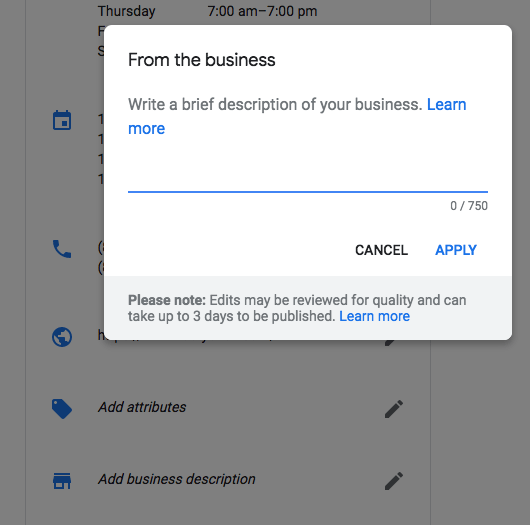
To add your business description, log in to Google My Business, click on the “Info” button on the menu bar, and then you’ll see that one of the new sections is labeled “Add business description.” Click on the pencil icon next to that field, and a menu will come up letting you enter a brief description of your business.

Here is a screen shot:

Google has also posted more details about this feature in its help docs.

The post You can now add your business description in Google My Business appeared first on Search Engine Land.

Google adds air quality data in search results

Google now will show air quality and pollution data in the search results. If you search for [air quality], [air pollution] and/or qualifiers with city qualifiers, such as [air quality in nyc], Google will show a rating of the air quality in that city.

Here is a screen shot of the NYC example:

And for Beijing, where the air quality rated as “unhealthy”:

This works both on desktop and mobile search on Google.com.

The source of the data is from a company named BreezoMeter, and if you click through on the company name in the footer of the answer, it shows more details about the air quality in that location.

The post Google adds air quality data in search results appeared first on Search Engine Land.