Friday, February 12, 2016

A Layman’s Visual Guide To Google’s Knowledge Graph Search API

knowledge-graph-google-1200

Google released their much-delayed Knowledge Graph Search API on December 16, 2015, which was announced in a post on Google Plus by Freebase. (They did so after retiring Freebase, to support users of the Freebase API.)

The Knowledge Graph Search API allows users to query Google’s Knowledge Graph database to obtain information on the entities contained therein. According to Google, some typical use cases include:

• Getting a ranked list of the most notable entities that match certain criteria.

• Predictively completing entities in a search box.

• Annotating/organizing content using the Knowledge Graph entities.

An illustrated guide is provided below to enable anyone to access this API so its query capabilities can be leveraged and utilized without the need for any programming language skills. The only prerequisite is that you must have a Google account.

The Knowledge Graph Search API: Getting Started

The Knowledge Graph Search API can be found within Google’s APIs Explorer, shown below:

Google-api-explorer-knowledge.jpg

Google’s APIs Explorer,”Knowledge” highlighted [Click to enlarge]

Selecting “Knowledge Graph Search API” will take you to a screen that looks like this:
Google APIs Explorer

[Click to enlarge]

Click the entry above, which will take you here. You may find it helpful to bookmark this link, as it will typically be your starting point.

The Knowledge Graph Search API: Input GUI

You now have a screen with a graphical user interface (GUI) that contains all the parameters contained in the Knowledge Graph API (the details of which you can find here in their developer guide on the topic).

GUI-Google-Knowledge-graph-search-api

Explorer GUI for the Google Knowledge graph search API [Click to enlarge]

The query parameters below map directly to the input fields specified in the API (See original documentation for more info):
Knowledge-Graph-Search-api-Query-parameters

Query Parameters: Knowledge Graph Search API

So let’s look at a few things we can do with this API and see what sort of results we get.

As stated in the developer guide, the API does not return “graphs of interconnected entities,” merely the entities being searched for (with almost no associated attributes or predicates).

The “ids” field refers to the machine-generated identifier (MID), which is key to understanding concepts in both Freebase and the Google Knowledge Graph. A MID is, as per the Freebase wiki, a unique identifier for an entity. It just so happens that Google appears to leverage them and be dependent upon them in some aspects.

This means that it is important to be able to understand and recognize them. Luckily, it is easy to determine what a freebase MID looks like. They typically start with “/m/” and then some very short appended string (e.g., The MID for “Barack Obama” is /m/02mjmr/).

An easy way to now obtain a MID for any entity is now just to enter it into the “query” field in Knowledge Graph Search API.

Google APIs Explorer barack obama query

Google APIs Explorer barack obama results

You can also find MIDs in Google Trends. When you select an entity from the autosuggest list that appears as you begin to type in a query, the resulting URL will contain the MID:

Google Trends barack obama

Google Trends barack obama URL

Of interest is that Google still uses MIDs as identifiers here, and not the Qids that Wikidata uses, although there are published mappings from the one to the other. In some regards, you can think of the MIDs as akin to the notion of a “primary database key” for the Knowledge Graph.

(Editor’s note: Contributor Clay Cazier recently wrote a great introduction to Wikidata.)

The Knowledge Graph Search API: Output Fields

Response-Fields-Knowledge-Graph-Search-api

Response Fields: Knowledge Graph Search API

Looking at the above, you can see definitions for precisely what is returned in the “Response” area when you execute a request using the Knowledge Graph Search API.

As stated in the specs, a response message contains a list of entities, presented in JSON-LD format and compatible with schema.org schemas (with limited external extensions). Samples of the output are illustrated and interpreted in the Examples section below.

Contrary to my initial intuitive thoughts, querying the API and restricting output to the type “Person” does not provide the full Person Entity with all the associated attributes of that person, but rather just those items listed in the figure above. (It always helps to read documentation prior to playing with data; however, sometimes it is more fun to just start playing with the data. Google does state that if you want a richer, graph-based response, you can move over to Wikidata and obtain the information from that source instead.)

The API does return the MID used by Google, which is useful when applying semantic markup and adding identifiers to fully disambiguate your content, as described here. With Freebase retiring, this may now be the best way to obtain those identifiers. Adding identifiers is probably generally best done in the last stages of applying semantic markup and is very helpful to the search engines in terms of disambiguating your content.

Another interesting field that’s worthy of note is the resultScore, which is defined as “[a]n indicator of how well the entity matched the request constraints.” (It is likely it may be a type of entity metric, as I described in a previous article.)

Examples

Playing with various inputs and looking at the results can provide some interesting insights. I am going to walk through two queries here and see what we can glean from the results.

In the first query, I entered the Query term “President of the United States,” and for the type, I put “Person.” (Types are derived from schema.org, in this case, schema.org/Person.)

knowledge graph search Query

Query: “President of the United States”/Type: “Person”

I then clicked the “Execute” button. This query yields a long output (JSON-LD can tend to be rather verbose). For the purposes of this article, I merely showed the first result page in the figure below. This also provides an example of  what to expect in terms of the response format.

Results-of-Query-1

Results from Query 1: “President of the United States” — Barack Obama comes in first with a resultScore of 1407.[Click to enlarge]

A list of EntitySearchResults is returned, the first of which is Barack Obama, whose MID is /m/02mjmr. The associated resultScore is 1407. The second result is Bill Clinton, with a resultScore of 1341, and then Franklin Roosevelt, with a resultScore of 870. George Bush is next, with a resultScore of 785. The description strings do contain which number President of the US the person is, but the ordering is by the resultScore in descending order as it appears.

The next query I elected to run — “Presidents of the United States” — was similar but instead included the plural form of the term “president” (which would imply I received a list of results, rather than a specific answer).

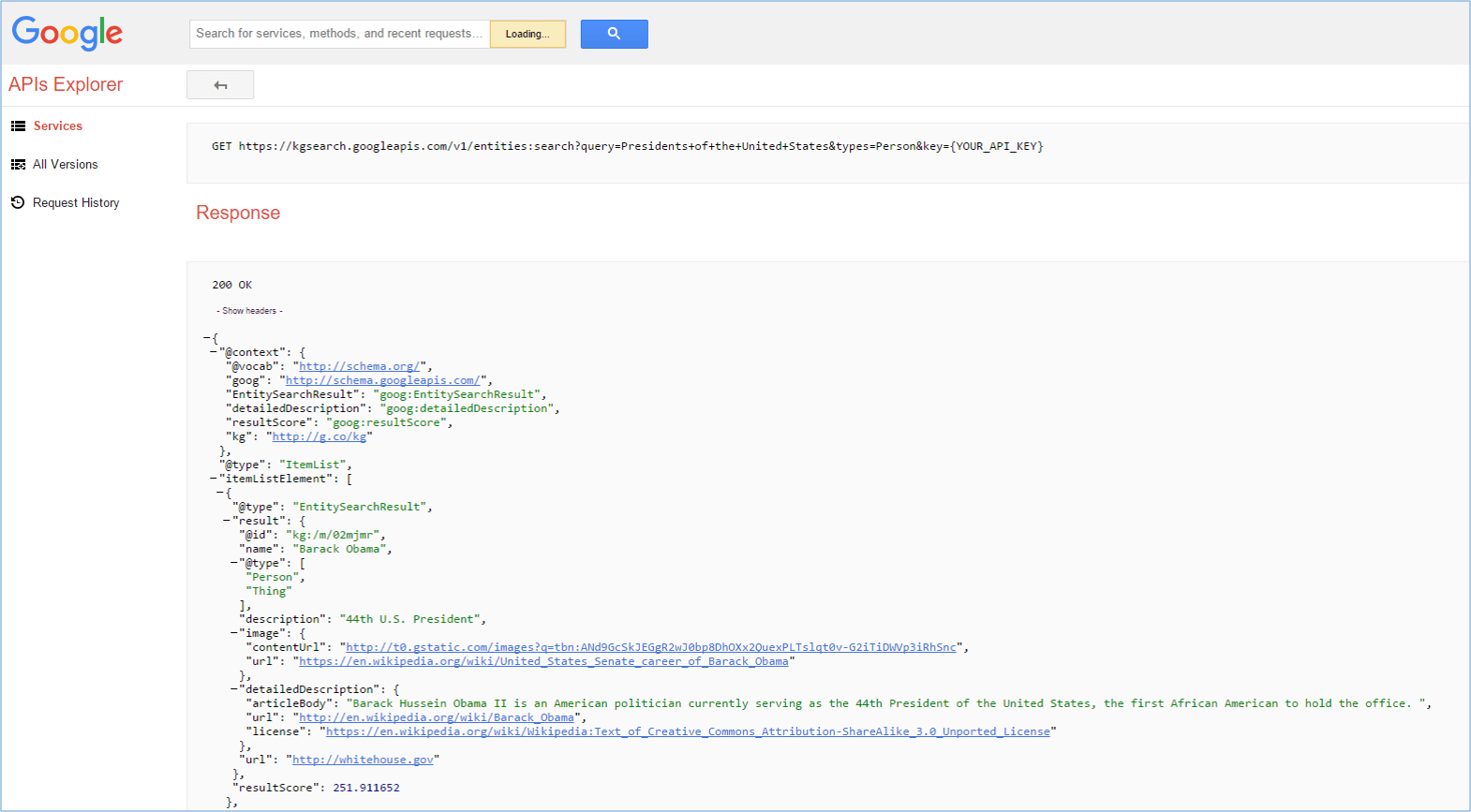
Running that seemingly similar query in place of the previous term yielded similar results, yet the resultScore for the number 1 entity in the Response was now 251.

The results are illustrated in the diagram below. (In addition, in the image,  you can also see the query itself, in the “GET http:” line, before you see the response with the 200 – “OK” – code.)
results-of-query-2-presidents-of-the-united-states

Results from Query 2: “Presidents of the United States”/Type-restricted to “http://ift.tt/13a7gYC; [Click to enlarge]

You can see how the resultScore for the entity Barack Obama now drops to 251.  This is presumably because the intent behind those two queries is very different (although the query “strings” may look very similar).

Visualization Of The Result Data From Query Number 1 In A Triple Store

For the next helpful visualization, I decided to take the output and load it into Gruff, which is the graph-based visualization tool from Franz Inc. (You can download a copy for free.)

I also used Greg Kellogg’s RDF distiller to convert the results from JSON-LD to triple format before I loaded it. I then selected the first result and created the visualization below.

The visualization definitely helps in understanding how “things” are linked together.

Barack-Obama-And-Entity-Search-Result-Visualization-in-Gruff

Visualization of the first Entity Search Result in Gruff

Conclusion And Takeaways

Google’s announcement last week that they now support JSON-LD for rich snippets for products and reviews, coupled with the fact that Knowledge Graph search results are only returned in JSON-LD format, provides a strong inkling that providing semantic markup in JSON-LD format is a worthwhile approach for SEOs to adopt.

Using this format for structured data markup means that there is no longer a need to place markup that is correctly wrapped around the appropriate HTML elements — JSON-LD markup can be placed in the header or footer of the page, which radically simplifies things.

Adding identifiers as the last step of the process, in terms of adding semantic markup to a page, and hence aligning your page entities with those in Google’s Knowledge Graph, is a “must.” Obtaining those identifiers is now a simple matter of looking them up in Google’s Knowledge Graph Search API, as I have described above.

In addition, there is a lot of relevant and must-read coverage on the Knowledge Graph Search API that I did not cover, which you can find here.

Also ensure you adhere to all of the structured data policies specified by Google. There are many details that have changed, and the policies continue to evolve.

Helpful Resources

The post A Layman’s Visual Guide To Google’s Knowledge Graph Search API appeared first on Search Engine Land.

Search In Pics: Google Jedi Master, Aerial Silks Class & Sundar Pichai Meets NFL’s Ronnie Lott

In this week’s Search In Pictures, here are the latest images culled from the web, showing what people eat at the search engine companies, how they play, who they meet, where they speak, what toys they have and more.

Googler Riding A DeLorean:

Googler Riding A DeLorean
Source: Google+

Google Aerial Silks Class:

Google Aerial Silks
Source: Google+

Google Jedi Master:

Google Jedi Master
Source: Google+

Google’s CEO Sundar Pichai Meets NFL’s Ronnie Lott:

Sundar Pichai Ronnie Lott
Source: Twitter

The post Search In Pics: Google Jedi Master, Aerial Silks Class & Sundar Pichai Meets NFL’s Ronnie Lott appeared first on Search Engine Land.

Google Won’t Provide SEO Certifications To Webmasters Or SEO Companies

seo-notebook-notes-ss-1920

Yesterday, the folks over at Stone Temple Consulting interviewed Google’s Gary Illyes and posted the interview on YouTube and one question that Gary answered was around SEO certification. In short, Gary said that Google discussed internally if they should add an SEO certification program and has decided not to do so.

Google does offer certification for AdWords, display ads, AdSense, Analytics, Google Apps and the list goes on an on. But for SEO, that is somewhere Google will not be offering certification.

It seems like the main reason is that Google doesn’t want to accept money from webmasters when it comes to the organic search results. Organic results are not based on paying Google and if Google accepted money for certification, it feels wrong – Gary implied. He also said that certification and training doesn’t scale well and again, the organic search side of Google is all about scaling things.

So while Google has discussed SEO certification many times, each time they come back to the same outcome – that they will not provide SEO certification.

Here is the video embed which starts at the 55 minute mark:

Matt Cutts of Google had a video back in 2010 about SEO certifications where he explains why it is hard for Google to offer such certification:

Also, former Googler, Pedro Dias has a older post about why Google doesn’t provide SEO certification.

As I said, I think the closest thing to Google’s SEO certification is Google’s top contributor program. But even there, there is a fine line drawn about their connection with Google.

The post Google Won’t Provide SEO Certifications To Webmasters Or SEO Companies appeared first on Search Engine Land.

Google Mobile Image Search Adds Drop Down & Other UI Changes

google-mobile-search-ss-1920

Google has quietly made some tweaks to their mobile image search interface. When you click on an image within the mobile image search interface on Google, you are given a menu button at the top left of the image that now lets you select from four options.

Those options include:

  • View original image
  • View saved
  • Search by image
  • Send feedback

Here is a picture:

google-mobile-image-results-1

When you scroll down, you are given “related images” to the image you are viewing now:

google-mobile-image-results-2

The post Google Mobile Image Search Adds Drop Down & Other UI Changes appeared first on Search Engine Land.

Thursday, February 11, 2016

SearchCap: Google Expands RTBF, Google PLA GTINs & Crawlers

searchcap-header-v2-scap

Below is what happened in search today, as reported on Search Engine Land and from other places across the web.

From Search Engine Land:

Recent Headlines From Marketing Land, Our Sister Site Dedicated To Internet Marketing:

Search News From Around The Web:

Industry

Local & Maps

Link Building

Searching

SEO

SEM / Paid Search

Search Marketing

The post SearchCap: Google Expands RTBF, Google PLA GTINs & Crawlers appeared first on Search Engine Land.

Retailers, GTINs Required By May 16 For Google Product Listing Ads

google-shopping-cart-2016a-ss-1920

Last year, Google announced it would begin requiring advertisers to include the GTINs for products from 50 brands in their Merchant Center product feeds. More recently, though, Google has said the GTIN requirement will be expanding beyond those 50 brands.

“If you sell brand-name products that are sold by multiple merchants, you should take a close look at the new requirements and double-check that your product data is correct and up-to-date.”

Bottom line: If you are promoting products that have GTINs, now is the time to make sure your feeds are updated to include them.

May 16, 2016, is the date Google will start disapproving relevant products that don’t meet the GTIN requirements.

GTINs will be required when targeting ads in Australia, Brazil, the Czech Republic, France, Germany, Italy, Japan, the Netherlands, Spain, Switzerland, the UK or the US.

Google has begun showing item-level warnings in the Diagnostics tab in Merchant Center for products that are missing or have the wrong GTIN.

More information about unique product identifiers is available on the Merchant Center help page.

The post Retailers, GTINs Required By May 16 For Google Product Listing Ads appeared first on Search Engine Land.

5 Simple Strategies To Improve Your Blog’s Search Rankings

typing-blogging-keyboard-ss-1920

Whether you’re a B2B or B2C marketer, there is ample opportunity to boost your search engine rankings through blogging. However, you can’t implement a short-term approach to build a long-term source of organic traffic.

When you’re doing SEO, you need to be cautious. Some of the strategies that worked in the past will now get you penalized. On the contrary, some strategies that formerly weren’t worth your time are now essential.

If you want to build a sustainable web presence, then you need to adapt to the changes of Google’s algorithm. Whether you see these modifications or not, they are happening.

As you continue to align your content to the updated algorithm, you’ll gradually generate organic traffic. But more importantly, you’ll be able to attract prospects that could potentially become loyal customers.

Popular avenues for generating traffic to a business’s website include blogging, SEO, social media and email marketing. Many of these can (and, I would suggest, should) be used in conjunction with one another.

For example, blogging accounts for a large portion of traffic for businesses — and if you continue to create relevant, high-quality content, it will increase your rankings in the search engines, especially if you optimize your posts and promote them via social channels and email.

Today, I will share five tips that you can use to build a reliable source of organic traffic to your blog site:

1. Stop Focusing Solely On Keywords

Over the past few years, Google has made a concerted effort to value the overall experience of its users, which was all the more evident when it rolled out Hummingbird, a smarter search algorithm that looks at keywords in context. Their goal is to move away from seeing search queries as strings of keywords and towards understanding them as meaningful concepts.

A result of this is that Google now places greater emphasis on the value of your content than on the specific keywords it contains.

Does this mean that you shouldn’t optimize your content for keywords? No. The search engine still relies on keywords to some extent to understand the relevance of your content, but it’s gotten better at understanding context and detecting spammy, thin content — meaning that the days of achieving strong rankings simply by placing the main keyword in the title of your blog and repeating it over and over again throughout the content are over.

The key is to focus on creating quality content that provides useful information to your audience. If you want to rank number one for a keyword, then create content that deserves to be ranked number one. Stop looking for the shortcut in SEO. This mindset will do nothing but impede your visibility in the search engines.

2. Share Your Content On Social Media

More than two million blogs are posted each day. If you want to rank high in the search engines, then you need to get your content out into cyberspace. One of the best ways to do this is by building your brand visibility through social media.

Start sharing your blog posts on Facebook, Twitter and Google Plus. Create a social media regimen that holds you accountable each week. The more places your website is featured, the more data Google with gather on it.

Your social media fans are probably not ready to purchase your products. Unlike search engine users, they aren’t looking for an immediate solution to their problem. However, they are always interested in rich content related to the topics that matter to them and the problems they are trying to solve.

Creating thoughtful, useful content will ultimately improve the user experience of your fans. As you continue to provide value, they will start visiting your web properties. This will increase the level of engagement on your social media channels, in addition to your organic reach. It also can’t hurt that you’re potentially getting backlinks to your useful content pages.

Building a social media presence will enhance your brand’s visibility. Is there a concrete method to measure the SEO impact of social media? Considering Google hasn’t explicitly addressed this issue, I can’t say for sure.

What I can say is that in my experience, when you distribute your content through a myriad of social platforms, you’ll generally notice more links. The social media dynamic is similar to a “cocktail party.” Always lead with value, and don’t try to pitch your fans repeatedly.

3. Quality Versus Quantity Links

The more links to your website, the better, right?

Not anymore.

Links are still a determining factor in the search engine rankings. However, the days of creating thin content and “link blasting” are over.

Buying backlinks is fast, simple and relatively cheap, and there are many SEO agencies that can provide hundreds of links to your website. But proceed with caution, because this practice could lead to a penalty (and potentially ruin your brand) if the following applies:

  • You receive a large volume of links in a short time frame.
  • The links aren’t relevant to the theme of your website.
  • The linking websites have a low Domain Authority.

These days, the quality of your inbound links is what matters most. The link-building mindset change from “quantity” to “quality” can largely be attributed to Google’s web spam algorithm, Penguin, which was introduced in 2012 and was aimed at websites buying links (bad or good) strictly to boost their Google rankings.

Nowadays, any SEO impact that you get from link building is predicated on the idea that these links provide real value to users who might come across them.

4. Promote Your Content To “Earn” Links

Most novice marketers buy into this erroneous notion of “if you build it, they will come.” Unfortunately, this is seldom the case. If you want to enhance your brand awareness, then you need to heavily promote your content.

If you don’t have an inbound marketing strategy that will help you “earn” links, then it will be difficult to build a sustainable source of organic traffic. My first piece of advice is to figure out who your audience is (through polls, surveys and cold calls) and what problems or needs those prospects are looking to solve or fulfill.

Your content should directly address these needs, and you should create a social media content promotion regimen that gets your content out in front of your audience on a regular basis (which social media avenues you use will also depend on your audience).

You might be asking, What are “earned” links?

They reflect the value that you deliver to your market. For instance, if you get a backlink to your website from guest posting on another site, that’s technically not an “earned” link. It’s a result of your time and effort. But when another credible source in your niche links to your website, then you have “earned” a link.

This idea of pursuing earned links has essentially forced marketers to step up their game. If you aren’t creating useful content, then don’t expect anyone to link to it.

There are no shortcut strategies to increase the number of earned links to your website. The best advice is to focus on creating thoughtful, useful content that meets the objectives of your audience.

5. Optimize Your Website For Mobile

The technology trends in our society have diversified your target audience. Your customers are no longer all sitting at their desk behind a personal computer to access the web.

Mobile has essentially taken over. Google has adapted to the behavior of its users, and therefore, so should you. The “Mobile Friendly Update” went into effect on April 21, 2015, which essentially leveled the playing field between mobile and PC users.

Google has stated that the majority of monthly searches in 10 countries (including the US) have come from mobile devices.

Here are three tips that you can use to optimize your website for mobile users:

  • Layout. Ensure that your pages, menus and posts are optimized for mobile.
  • Behaviors. Your landing pages and sales pages might require different strategies on mobile. Tools such as Crazy Egg will help assess the behaviors of mobile and desktop users.
  • Content. Is there a disparity in the content that mobile and desktop users want? Determine what format is generating the most traction with mobile visitors to your website.

Conclusion

Nowadays, SEO is a long-term strategy that encompasses all relevant aspects of digital marketing. The best way to increase your search engine rankings is by creating useful content that addresses the core needs of your audience.

If you promote your content across a multitude of social media platforms, you’ll ultimately build a reliable source of organic traffic to your website.

What other strategies do you use to improve your SEO rankings?

The post 5 Simple Strategies To Improve Your Blog’s Search Rankings appeared first on Search Engine Land.